Showing posts with label post production. Show all posts

April 08, 2014

Blackmagic Ursa upgradable camera

Blackmagic Design has announced a new high-end digital film camera with a user-upgradable sensor and lens mount, larger-than-normal 10-inch fold-out monitor, and a multi-screen design that should make it simpler to use. Its feature set and upgradability cover many of the most common requests on user’s wish lists.


The Super 35-sized Ultra HD (3840 x 2160) image sensor has a global shutter (so no more CMOS sensor rolling shutter effects) and will be replaceable, along with the lens mount, which can be EF or PL, or even, with a broadcast video sensor, a B4 mount.

April 08, 2013

Blackmagic Pocket Cinema Camera


Blackmagic Design keeps on keeps on disrupting the market with broadcast equipment at lower prices than the competition, and has done it again with two new cameras: The £665/$995 Blackmagic Pocket Cinema Camera and the £2,675/$3,995 4K Production Camera.

Both offer high quality lossless 12-bit CinemaDNG RAW and Apple ProRes recording, and lots of interesting features that should keep prospective buyers salivating until they ship in July.

March 29, 2013

Final Cut Pro updates


Apple has updated Final Cut Pro X (to 10.0.8), Compressor (to 4.0.7), and Motion (to 5.0.7). 

FCP X version 10.0.8 is mainly a maintenance release, but it does add a couple of features.

Users of Arri Alexa cameras can now record Apple ProRes with Log C video levels, then view with standard contrast and colour levels in Final Cut Pro X. This non-destructive display option lets you view footage in the Rec. 709 colour gamut (the standard for broadcast video - pictured above) without having to render or apply an effect, while accessing the full dynamic range of Log C (which has so little contrast it almost looks foggy - as seen below) for colour grading and compositing. When editing is complete, export XML from Final Cut Pro X to send the Log C files for finishing in third-party applications such as DaVinci Resolve or Autodesk Smoke.

February 22, 2013

Come see us at BVE - free seminars


Broadcast Video Expo is Britain’s best conference and exhibition for anyone working in the video industry. It has lots of interesting FREE seminars to attend, and is probably the single best place to find out what is happening and make new contacts.

Previously it took place at Earls Court, which was ideal for those of us in what is a west-London-centric industry. However, this year it moves to the Excel Centre in distant east London, so it’s lucky that the seminars we’re taking part in aren’t early in the morning…

There are apparently 283 seminars in total (including those in specific manufacturer’s theatres), so BVE is a great opportunity for some free training. There are also supposed to be 331 exhibitors, so there is a lot to see and do – it’s worth making the journey.

We’ll be taking part in three sessions:


When we’ve done Q&A sessions at previous BVE conferences they have always been packed, so we’ve got another “ask the experts” session this year (Tuesday 5pm), with the assistance of some well known names to answer your questions on any aspect of production and post-production, covering cameras, audio, lighting, editing, and general production problems you may have.

We’ve got a group of independent experts to answer your questions, all experienced industry professionals and media trainers. The current line-up includes the ebullient Matt Davis - www.mdma.tv, the effervescent Alex Gollner - www.alex4D.com, and the ever audible Nick Way - www.nickway.co.uk (although as they are all freelance, that might change….), as well as ourselves. So do come along and bring your questions.

The clinic will be held in the Producers' Seminars Theatre from 17:00 - 17:45, 26 Feb 2013.


Christina will be taking part in one of the drop-in Skills Zone sessions on Wednesday at 4pm, to answer questions about running your own media business. The Skills Zone is worth checking out if you want to develop your career, as there are sessions about CV writing, tax, contracts, script writing, pitching, and starting out in cameras.

The seminar will be held in the Skills Zone Theatre from 16:00 - 16:45, 27 Feb 2013.


On Wednesday (5pm) Christina is giving her ever-popular talk on how to survive and even thrive as a freelancer in a digital, self-shooting world (this is always packed - as seen in the photo from last year, so come early if you want a seat….). It is particularly useful for anyone starting out in the industry, but there will probably be many things that will be useful for people who have even been freelance for several years.

It will cover all the essentials from getting work to getting paid, including the three most important lessons she has learnt as a freelancer…

The seminar will be held in the Producers' Seminars Theatre from 17:00 - 17:45, 27 Feb 2013.

By David Fox

February 20, 2013

Arri upgrades with Alexa XT


Arri has refreshed its digital cinema camera range with the new Alexa XT (Xtended Technology), which will offer: a compact, built-in Raw recorder capable of recording up to 120 frames per second at high quality; a built-in neutral density filter; a 4:3 sensor that can be used with anamorphic lenses; full support for lens data; a new, stronger viewfinder mounting bracket; and an even quieter fan.

The Alexa XT, Alexa XT M, Alexa XT Plus and Alexa XT Studio cameras will replace all previous models except for the original Alexa. Owners of existing Alexa cameras will be able to purchase individual upgrades that deliver most of the features of the XT configuration, including the XR recording module, ND filter module, viewfinder mounting bracket, viewfinder extension bracket, XT Fan and the anamorphic de-squeeze and high speed licenses.

XR Module

Feature films often record Arriraw to capture uncompressed, unencrypted image data so that they have maximum flexibility in post. Recent movies that recorded in Arriraw include Skyfall, Life of Pi, Marvel’s The Avengers, Hugo, Zero Dark Thirty and Amour.

However, recording in Arriraw has previously involved using an external recorder, such as the Codex Onboard, but a lot of users have asked for built-in Arriraw recording, which is why Arri decided to work with Codex to develop the new XR Module. The camera’s modular design means that existing Alexa owners will also be able to quickly swap in the new module for the existing SxS card module.

The result is a smaller, lighter, more affordable, cable-free camera package that records Arriraw inside the camera, at up to 120fps. It uses fast, rugged 512GB XR drives that can also be used to record Apple’s ProRes or Avid’s DNxHD formats, including ProRes 4444 at 120fps. At 6.7Gbps the solid-state XR Capture Drive is claimed to be the fastest digital magazine available. With an SxS Adapter it is possible to record ProRes or DNxHD to a single SxS PRO card, so you can still use existing cards.

For post production the XR Capture Drive offers several different workflows familiar to anyone who has used Codex recorders. First, a small, affordable USB3 Single Dock allows quick, safe copying of data onto a laptop. Second, the Dual Dock can make clones of XR Capture Drives and connect to a Mac Pro via a high-speed SAS interface for speedy copying, archiving or dailies creation. And third, the Codex Vault is a modular and rugged all-in-one system for fast, easy copying, archiving, reporting or dailies creation on or near set.

Neutral Density

The new In-camera Filter Module IFM-1 allows Alexa XT models to be rated at the base sensitivity of EI 800 without the need for external ND filters, even in bright sunlight. Filtering behind the lens rather than in front is quicker and simpler and reduces weight and reflections. The IFM-1 offers eight densities, from ND 0.3 to ND 2.4.

True anamorphic sensor

A lot of moviemakers prefer using anamorphic lenses, to give the CinemaScope look. These squeeze the wider aspect ratio on to the 4:3 sensor that is now standard on the XT cameras (it was previously only available on high-end Alexas). The sensor is the same size and shape as a Super 35mm film frame, so it is also useful for HD productions as it permits significant reframing of the image in post, similar to shooting 4-perforation 35mm film. An anamorphic de-squeeze license is included with all XT cameras, as is a high-speed license for filming at up to 120fps.

Lens metadata

If you are doing anything complex in post, particularly visual effects, it is very useful to have access to lens metadata (which will record what iris, focus and zoom settings you are using for every shot). All the XT models are equipped with an LDS lens mount. The Arri Lens Data System reads the position of all lens rings and writes them into metadata in every format Alexa can record. More than 41 lens models have LDS built-in, including the Arri/Zeiss Master Anamorphic, Master Prime and LDS Ultra Prime series, the Master Macro 100 and the Arri/Fujinon Alura Lightweight Zooms. For all other lenses it is possible to store the lens table inside the Alexa by using the Lens Data Archive feature.

Viewfinder mounting

To make the camera a little easier and more comfortable to use, there is a new Viewfinder Mounting Bracket (VMB-3), with a much stronger, more rigid design, partially achieved through the use of two 15mm lightweight rods. These rods also facilitate rapid changes in camera support, i.e. from a tripod to a crane or Steadicam, since accessories such as lens motors or follow focus units can be hung from the rods rather than cluttering up the base plate. Also available as a separate accessory is the new Viewfinder Extension Bracket (VEB-3), with a foldout arm that holds the viewfinder securely in place when moving the camera.

Silence of the fans

Alexa cameras are some of the quieter digital cameras, but a new, improved fan has been included in the XT models, to make it more usable in very quiet or very hot environments.

By David Fox

August 24, 2012

CPUG Amsterdam SuperMeet at IBC

The Creative Pro User Group Network will be holding its Fifth Annual Amsterdam CPUG SuperMeet to coincide with IBC (the International Broadcasting Convention – Europe’s biggest broadcast conference and exhibition). 


There will be lots of presentations and demonstrations, including sneak peeks, and the seemingly endless raffle with more than €31,000-worth of production and post-production kit to be won.

As usual, it promises to be the biggest meet-up of Final Cut, Adobe, Avid and Autodesk editors and independent filmmakers during IBC. Food will be included and there is lots of opportunity to network.

It is being held in the Grand Hotel Krasnapolsky on Dam Square. Doors open at 4:30pm with showcase of more than 20 software and hardware developers, such as: Adobe, Autodesk, Avid, Blackmagic Design, Red Giant Software, Atomos, Axle Video, B&H, Amsterdam's College Of Multimedia, Drobo, The Future Store, G-Technology, Mocha, Noise Industries, The Padcaster, pond5, Promise Technologies, Shutterstock, Sonnet Tech and X2Pro (many of whom are donating raffle prizes).

SuperMeet presentations begin at 7pm, and will include (not necessarily in this order):

The award-winning cinematographer John Brawley, who was the first to get his hands on the new Blackmagic Cinema Camera, will show what it can do and talk about how it works and his post workflow using Blackmagic Design’s new DaVinci Resolve 9.

Michael Cioni, CEO of Hollywood post facility Light Iron Digital will lead a discussion about how the changing media ecosystem is changing filmmaking, and talk about new workflow and creative opportunities. One of Light Iron’s specialities is on-site dailies, and it has created a couple of iPad apps: Live Play – an automated digital playback and on-set collaboration tool; and Todailies (below) – which gives directors, cinematographers, script supervisors, and key production personnel the ability to take home and review camera takes or pre-visualizations.


Ken La Rue and Marc-André Ferguson, from Autodesk, will run through the all-in-one workflow of the new Smoke, including dealing with green screen, keying, tracking, colour correction and editing. The Smoke 2013 pre-release trial will be available until December and can be downloaded at: www.autodesk.com/smoke-trial.

Adobe’s Al Mooney will give an update on Premiere Pro CS6, and share a peek at “some very exciting future technology”.

Avid’s Adam Green will be revealing Avid news from IBC, while Filmlight's Martin Tlaskal will show off Media Composer’s AVX2 plug-in architecture with the latest Baselight for Avid plug-in.

Freelance trainer/author, Simon Walker will demonstrate three new releases from Red Giant Software: Trapcode Mir, PluralEyes and Knoll Light Factory, the light effects tool developed by ILM Visual Effects Supervisor John Knoll. Webby Award-winner Seth Worley (who made the brilliant Plot Device) has directed another excellent short film, Order Up, to show off what Knoll Light Factory 3 can do.

There are also likely to be other speakers, including independent film makers/editors.

Tickets cost €15 each online (€20 on the door), or €10 for students and teachers. But, you can save €5 off the ticket price by using the promotional code ibcvip when registering.

Also of interest during IBC will be DSLR Meetup 2012 Amsterdam with Philip Bloom on Saturday, September 8th at 8pm, at Café ‘De Pont’ behind Central Station (and a short trip on a free ferry). The theme of the evening is time lapse.

By David Fox

August 16, 2012

Is FCP X ready for broadcast?

After a year of updates, is Apple’s best-selling non-linear editor, Final Cut Pro X, finally ready for primetime? 
The following was written for the August issue of the broadcast industry magazine: TVB Europe - available free online or downloadable to iPad via Newstand.
When Apple introduced Final Cut Pro X last year, it wasn’t so much an update to FCP 7 as a completely new non-linear video editing program. It was a radical re-think of how we do editing, but because it was essentially a version 1.0 release, it became more talked about for what it didn’t do than its new features.

Amongst broadcast editors, especially, the initial reaction was one of dismay. Many aspects of the traditional broadcast workflow weren’t supported. Indeed, so great was the backlash that Apple soon put the discontinued FCP 7 and the Final Cut Studio package back on its shelves, so that facilities and production companies that relied on the earlier version didn’t need to upgrade to X if they wanted to add further edit seats.

February 08, 2012

Meet us at BVE – Free seminars

As usual, we’ll be giving talks at BVE/The Production Show at London’s Earls Court next week (14-16 February 2012). Our five sessions will be part of an extensive free seminar programme, with more than 300 seminars across the three days.

We’ll be doing our Production On A Budget sessions every morning (10am) in the Production Theatre with lots of advice on buying equipment and what to look at while you’re at the show, while Christina will do a session on How To Survive As A Freelancer at 3pm in the Producers Theatre (on Tuesday) and in the Production Theatre (on Wednesday) – both theatres are in the Production Show section right at the back of the Earls Court 2 exhibition centre.

The Production Theatre will also feature sessions on Shooting Sub £15k Music Videos by Den Lennie, budget feature film production, underwater filming, shooting in the cold for Frozen Planet, Fathoming the Fundamentals of Formats from Prokit, and how to make the most of Blackmagic Design's Atem switcher.

The Producers Theatre will include the 99-minute Film School (in less than half that time…), with Raindance Film Festival founder Elliot Grove (who will also do a session on Writing For Low Budget Filmmaking), plus seminars on Strategies for Survival in a Freelance World, virtual production, how to win commissions and funding, motion control DSLRs and special effects make-up.

There is also an Arri Production Skills Centre [Free tickets required], with lots of sessions on lighting (including two each day by Jonathan Harrison), as well as seminars on using the Alexa and colour grading.

In the main Broadcast Video Expo section of the show, there will be 11 theatres/seminar areas, dealing with big picture issues such as the next steps for 3D, new developments in religious broadcasting, cloud computing and brands becoming broadcasters, to practical hands-on workshops.

The 3D Revolution [Free tickets required] will look at the latest developments and where 3D might go next, with keynotes from William Sargent, founder of leading Soho post house Framestore, and Dave Blackham, MD of Esprit Films (who will discuss shooting wildlife and caves in 3D). Panasonic’s Peter Van Hooke will present sessions on the recent Elbow concert shot live in 3D. There’ll be several case studies and sessions on when 3D is worth using and how to use it best.

The Audio Room [Free tickets required] also covers 3D, with a panel discussion on immersive audio systems led by Pieter Schillbeeckx, Head of R&D at Soundfield. There is a wide range of practical advice on audio recording, including Phil Coates on working in extreme locations, Graham Boswell from SADiE on how to eliminate pops and glitches, and Jo Tyler of Bournemouth University on the sonic potential for radio, and sessions on loudness metering, HD Voice (for mobile audio) and audio post.

The Post-Production Theatre [Free tickets required] has one of our favourite trainers, Larry Jordan, with: a practical overview of Final Cut Pro X; Creating Motion Graphics that Don't Suck; Compressing Your Video for the Web - and Making It Look Great; and What Creative People Need To Know About Storage. Other sessions include: the making of a Top Gear Live commercial, and lots on tapeless production.

Broadcast Meets IT picks up the tapeless theme, with Mark Harrison, Controller of BBC North, discussing the issues of file-based production and Shane Warden of IMG World presenting tapeless workflows at the Rugby World Cup. Dr John Zubrzycki of BBC Research and Development will discuss Super Hi-Vision for London 2012, and Phil Rutter of AndCubed hosts a debate on 4K production and delivery.

The Institute of Videography will offer sessions in the IOV Theatre on how professional videographers can get involved with local TV stations, what videographers need in their post-production toolkit, and lots on weddings, including Shooting the Marryoke Wedding Sequence.

The Content Delivery Theatre will deal with all sorts of online and other methods of delivery and making money, connected TV, the use of second screens (such as iPads) while also watching TV, broadcast playout using channel in a box systems, and social TV.

There will also be one-day sessions dedicated to various aspects of a specific topic. Religious Broadcasting on Tuesday 14 February; Demystifying the Cloud on Wednesday; and Brands Becoming Broadcasters on Thursday.

The Sony Experience Masterclass Theatre includes sessions on the FS100 by Den Lennie, the F3, F65, and using XMPilot to speed up logging on the BBC’s Escape To The Country.

Added to these are practical sessions offered by Avid [Free tickets required] and Adobe, and FCP X sessions run by Soho Editors.

There's also the opportunity to try out lots of new equipment...

Free registration is available at www.bvexpo.com/register using Priority Code EBPR2.

By David Fox

December 11, 2011

Review: Blackmagic Design HyperDeck Shuttle recorder

[UPDATE: Matt Grant (@MGcam on Twitter) has won our Blackmagic Design HyperDeck Shuttle competition. Congratulations Matt]


[UPDATE 2: Blackmagic has released new HyperDeck Shuttle 2, which adds ability to record Avid's DNxHD compressed format]

There are now quite a few field recorders available to allow you record higher quality video from your video camera or DSLR. I reviewed the Ninja not long after it was launched and really liked it. The one thing missing was HD-SDI but that has been fixed with the introduction of the Samurai (or the addition of Atomos new Connect connvertors, which includes an HD-SDI to HDMI version). Convergent Designs’ NanoFlash has been around the longest, and is often seen attached to a Sony EX1 or EX3 camera, there are also the AJA KiPro mini, Sound Devices Pix recorders and Fast Forward Video's sideKick, as well as several more expensive systems from the likes of Codex Digital, Cinedeck, and Convergent Designs (the new Gemini 444).

HyperDeck Shuttle with Solid State Drive

But, if you want the ultimate in quality, then being able to record an uncompressed picture should be the way to get it, and some of the high-end recorders allow that, but there is a cheaper way, which is why I was keen to test out Blackmagic Design’s HyperDeck Shuttle, an uncompressed portable recorder retailing around £250/$345.

First Impressions

When you get it out of the box the HyperDeck Shuttle feels a bit, well, minimalist. If it came in white you’d probably think it was an Apple device. In fact it is black and machined out of a solid block of aircraft-grade aluminium with seven buttons and six sockets.

Record - transport control - DISP  - power buttons

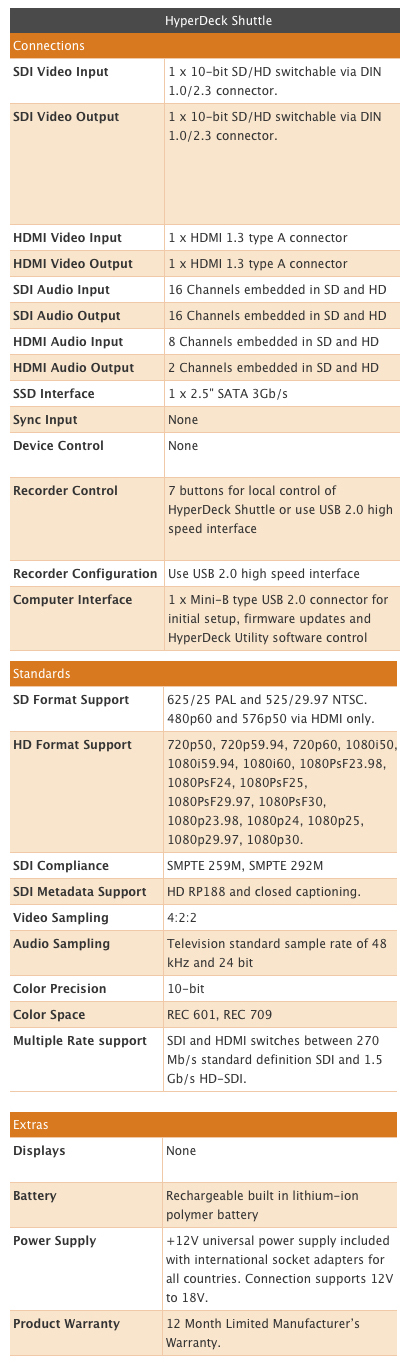
First of all, it doesn’t record in a range of selectable formats. So, there are no menus to dive in to as there is nothing to change. What the Hyperdeck Shuttle does is record 10-bit uncompressed video from your camera’s SDI or HDMI socket, plus eight channels of embedded audio in HDMI or 16 channels over SDI, and just bundles it up in a .mov QuickTime wrapper. It recognises whatever SD or HD format you are using

To give you some idea of file sizes, I recorded a minute of video using my Canon XF305 (at 50Mbps). When I checked on the CompactFlash cards the one minute (MXF file) was 391.7MB. 

One minute MXF file = 391.7MB

The same one minute on the HyperDeck Shuttle was 8.46GB.

One minute uncompressed video file = 8.46GB

It brought home just what my camera is capable of and how much compression my video is normally subjected to. If you intend to do a lot of post-production work on your video then recording straight to the HyperDeck Shuttle is a sure way of hanging on to all your data. You could always use the video on the CompactFlash for the offline edit, as proxy files or, at a pinch, backup.

But, with each minute taking up over 8Gb, I would only get about 15 minutes on a 128GB drive. So, you’ll have to plan ahead on how to handle the data. You could buy enough SSDs to get through a day or have a data wrangler on site to backup the SSDs as you go. Either way you will also need a large, fast drive to store all this data once you start editing.

The HyperDeck Shuttle does not come with a drive to record video so you must factor this into the cost. The review model I used came with a 2.5-inch (laptop size) 128GB Kingston Solid State Drive (SSD), which retails at around £120 (about $230 in the US), and format it using HFS+.

Kingston 128GB SSD - holds about 15mins of uncompressed video

Spinning disk drives are not recommended, as they are not capable of writing at the required speeds. In fact, not all SSDs are up to the job. If you go to the Blackmagic FAQ page you’ll find the current list of recommended 3Gbps SATA drives. At the time of writing these were:

1.              OCZ 240GB Vertex 3
2.              OCZ 480GB Vertex 3
3.              Crucial 256GB C300
4.              Kingston 64GB SSDNow V+
5.              Kingston 128GB SSDNow V+


Plugged In

The HyperDeck Shuttle comes with two HDMI sockets and two SDI sockets for video in and out. Whether you feed video in for recording by either HDMI or SDI, you can plug a monitor into either HDMI or SDI out socket. If you are of a nervous disposition you probably will want to plug in a field monitor to check on what is being recorded. However, there will be nothing on screen to confirm it is recording, how much it has recorded and how much disk space is remaining. This would have been useful – although if the SSD LED is lit, that indicates something is happening, and there is another LED to show that you are getting a video signal.

Power, HDMI in and out, SDI in and out and mini USB socket
(click on these images to enlarge)

How are you supposed to know when the SSD needs changing? Well, you need to keep an eye on the stop button. Once it starts flashing you have three minutes recording time left. Once the disk is full it obviously stops recording, the red recording light goes out and the green SSD indicator light stops flashing.

There is also a mini USB socket on the Shuttle. I wrongly assumed I could plug the Shuttle into my Mac and use it as a dock to review the video on the removable drive. In fact you will need to buy a separate dock for the SSD.

The USB is there to allow remote control of the device and to enable software upgrades. What I didn’t realise when I started the review was that this was something I needed to do.

When it first arrived I plugged in the HyperDeck Shuttle using an HDMI cable into my Canon XF305. But, the HyperDeck Shuttle was having none of it. It did not recognise the camera and/or video signal. It just would not record. After a call to Blackmagic they suggested the unit needed a software upgrade.

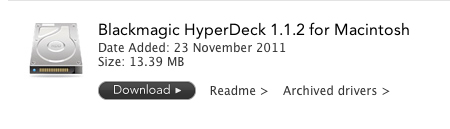
The first thing to do is go to the Blackmagic Site and you’ll see a link to download the Blackmagic Hyperdeck Utility.

Download for the utility to check for and install driver updates


I couldn’t see a download for a Windows PC, only for a Mac. The utility was only 13.4MB so didn’t take long to download and install.

The Blackmagic utility for software updates


The next thing to do was plug in the HyperDeck Shuttle into my Mac using a USB cable (not supplied) and then open the utility. The first couple of times they wouldn’t talk to each other but on the third attempt the utility suggested I needed to update the drivers. I clicked 'Yes' and the utility did the rest.

I unplugged the USB and tried recording with the HDMI – success. Everything now worked perfectly.

Now my next problem was how to test the SDI feed? My camera has the standard BNC connector and I have BNC to BNC cables in the office. But, the HyperDeck Shuttle has a mini coax SDI connector. I know I don’t have the correct cable – damn it. I realise manufacturers want to keep their prices low. But, I do expect them to include important cables. Anyway, fast forward and a few weeks later I have the correct cable and importantly a dock to plug the SSD into my Mac.

BNC to mini coax SDI connector 
You will also need a dock to transfer video from the SSD to your Mac 

After doing a Google search I see Blackmagic sell a cable pack for around £60/$90.

HyperDeck Shuttle plugged into my Canon XF305's HD-SDI socket

The final socket is for the 12v power. The unit can be run from the mains (adapter supplied) or from a built-in rechargeable lithium-ion polymer battery, which should last around one hour in record mode and 1.5 in playback.

Blackmagic warns (on the FAQ page) that: “Some drives consume twice as much power as other similar capacity ones from other brands.” So, you would definitely want to check how hungry the SSDs are that you intend to use. There is a four-LED battery indicator on the unit – once it goes out there are only four minutes of battery life remaining.

Button Up

There are seven buttons on the HyperDeck Shuttle. There are the usual media transport buttons: play, stop, rewind and forward, plus a record button and power on/off. The seventh button, DISP (display), doesn’t work at the moment, but it is promised that it will in a future software update.

Record - transport control - DISP  - power button


Get Mounted

In the Blackmagic blurb it says you can: “Take your HyperDeck Shuttle into the field, on set, to live events, or even on your extreme sport shoots.” If it does leave the building you will have to find a way to mount it onto your camera or tripod.

Out of the box it has no fixing plate or screw mounts. However, Blackmagic did announce a €69 mounting plate for the Hyperdeck Shuttle that should be available now. It provides multiple 1/4-inch and 3/8-inch mounting points. You could also use Velcro…

Mounting plate with lots of fixing points


In The Box

As I mentioned at the start, the unit is fairly minimalist. That could also be said for what was in the box – the HyperDeck Shuttle and power supply.

You will need:
  • Solid State Drives – big ones or lots of them.
  • A dock for the drives to transfer the footage to your editing/storage drive
  • An HDMI cable from camera to Shuttle [OR]
  • ... a BNC to mini coax SDI connector
  • A USB cable to connect the Shuttle to your computer for software updates
  • A mounting plate to attach it to your camera or articulating arm.

In Post

Once you've captured your video, it is straightforward to import the files into an editing system, such as Final Cut Pro, which can work with uncompressed material. Lower-power systems may have problems playing back uncompressed in real time, and unless you have the storage and bandwidth to cope with it, you may be limited to one or two streams of uncompressed.

I have a MacBook Pro 2.2Ghz Intel core i7 with 4GB of RAM - which struggled to play the uncompressed video in Final Cut Pro 7. The only thing to run smoothly was the spinning beach ball. However, this may be because my Mac has a spinning disk drive and not a SSD. If you want to work with uncompressed video, it is best to have a high-speed RAID storage array.

In theory, I could have edited direct from the SSD I had recorded onto. But, it was connected to my Mac via USB which caused a trickle of digits rather than the flood I needed. If only I had a dock with a Thunderbolt connection

However, you can transcode the files to any format you want to work with in the edit, such as ProRes 444 (if you want to maintain the highest quality), ProRes 422, or Avid DNxHD. Or do an offline edit at a lower bitrate and then conform the uncompressed in a suitably powerful finishing or grading system at the end. The pictures will be as good as the camera can produce.

Should you buy?

Broadcasters here in the UK have decided that 50Mbs recording is the minimum data to qualify as High Definition. Now this isn’t a problem for some cameras, but there are a few models that need a little extra help (such as the Sony EX1 and EX3). The Hyperdeck Shuttle will certainly keep the broadcasters happy.

However, this is a relatively big unit to strap to your camera (16cmx11cmx3cm) and weighs 660g with the SSD, but without the mounting plate. It is probably a little too large for fast moving situations, but would be great for location drama and studio set ups.

If you expect to do a lot of green screen shooting, compositing and colour correction then working uncompressed should ensure all the data latitude you’ll need with 10-bit colour precision and 4:2:2 video sampling.

It would be particularly well suited to a higher-end camcorder, such as Sony's PMW-F3, which records 35Mbps XDCAM internally, or the new Canon EOS C300, which records 50Mbps MXF files internally (like the XF305) – although the C300 only produces an 8-bit image it does output a 10-bit signal through the HD-SDI port so should work with the Shuttle with no problems. You could use the recorder with a camera that can record 12-bit video, but you'll only get 10-bits (you'd need a Codex, Cinedeck, Sony SRW-R1 or S.two recorder for 12-bit or above) and 4:2:2 (the Gemini 444, as the name suggests can do 10-bit 4:4:4 – as can all the 12-bit recorders).

The main reasons for not using a Shuttle would be its lack of a built-in monitor (if you don't have one or space to fit it), the fact that it doesn't currently tell you battery and memory status through the camera or other display, and, most crucially, if you'll be shooting and editing lots of material. Uncompressed video takes up such a large amount of space that this is almost certainly not the recorder you want if you are shooting an observational documentary, or editing on a low-to-mid-range system. SSDs will get cheaper (typically following Moore's law of half the price/twice the capacity every two years or so), bandwidth more available, and processors more powerful, so compression will become less necessary.

But given its price, even if you have to buy all the extras mentioned above, this is still a good value recorder, and will be really useful for many types of production, particularly commercials, promos and fashion shoots.

Christina Fox 


November 18, 2011

Edius to get 3D editing support

Grass Valley has unveiled new 3D tools for its Edius multiformat nonlinear editing software and is adding 3D support for editing peripherals to provide a complete stereoscopic 3D post production workflow.

The Storm 3G and Storm 3G Elite editing platforms will both be supported via the Edius timeline with stereoscopic 3D I/O through a single 3G SDI source and/or dual 3G SDI signals.

“We see 3D production and post projects increasing around the world and customers have been asking for easy-to-use tools within Edius to help complete those projects quickly and cost-effectively,” explained Charlie Dunn, Grass Valley's Executive VP of Products.

“Edius has always been a flexible, highly affordable platform and the product continues to grow and get better with time. Now anyone working on an Edius system can instantly add 3D post capability to their arsenal of production tools and generate new revenue by expanding their client base.”

The 3D support will include: native support for 3D video clips captured with the most popular 3D cameras; easy clip pairing for synching left eye/right eye clips; 2D-to-3D conversion capability; an array of simple tools on the timeline for 3D adjustments (to compensate for mistakes in shooting) with no transcoding; automatic convergence adjustment; and 3D preview monitoring.

Functions available in 2D are also supported in 3D, such as realtime colour correction, keyer, transitions and multicam editing.

A 30-day preview version of the new 3D software tools will be made available early in December 2011, on the Grass Valley website, and will include tools for importing, organising, and adjusting 3D clips efficiently.

For broadcast use, Grass Valley has also included integration with its K2 media servers, whereby its K2 ChannelFlex technology (a software application within the AppCenter Elite software suite) enables all K2 Summit and K2 Solo servers to be expanded from handling four SD/HD video streams to up to eight streams in specific applications such as super slo-mo, multi-camera recording, and 3D production.

Every K2 Summit production client and K2 Solo HD/SD server can be used as a 3D production server for 3D recording or replay, a 2x or 3x slo-mo recording device, or as a server for recording from 2-6 simultaneous camera angles with at least one channel for playback, via a software upgrade.

Edius is currently on a half-price offer until the end of the year for owners of other NLEs.

By David Fox

November 03, 2011

New Matrox Mojito MAX I/O card

The Matrox Mojito MAX  is claimed to be a first professional I/O card with an onboard H.264 encoding accelerator. The new PCIe card includes SDI, HDMI and analogue HD/SD video and professional audio connections.

Alongside the release, Matrox has announced support for the new Avid Media Composer 6, on this card and the rest of its MXO2 devices.

The Mojito MAX offers broadcast-quality input and output for other post-production applications, such as Adobe Creative Suite 5.5 Production Premium, Apple Final Cut Studio and FCP X, and will let users deliver H.264 files for the web, mobile devices and Blu-ray up to five times faster than software alone. 

Other features included in this 3/4-length PCIe card include 10-bit hardware scaling (for up-, down- and cross-conversion, including frame rate conversion) and inexpensive HD monitoring with the Matrox HDMI Calibration Utility.

The accelerator can cope with resolutions from 64x64 to 1920x1080, at bit rates from 100Kbps to 50Mbps, at various frame rates, with a choice of constant bit rate, constant quality or variable bit rate, built-in noise filtering, de-interlacing, and scene detection.

“The time-saving benefits of our unique MAX H.264 accelerator have been long appreciated by users of our portable MXO2 I/O devices, but many customers have been asking for an economical card for Mac Pro and PC workstations that can do the same job,” said Alberto Cieri, senior director of sales and marketing at Matrox.

“Mojito MAX nicely addresses the need for a single-slot card with SDI, HDMI, and analogue I/O plus H.264 encoding speed and quality — all at a breakthrough price point" – which is $995, £749 or €799, including the card plus a complete video/audio I/O breakout cable and an HDMI cable. 

Matrox Video Products Group is also supporting Media Composer version 6 for capture, monitoring, and output with its entire range of MXO2 I/O devices (pictured), costing from $449, £338 or €382. 

“Matrox MXO2 MAX I/O devices are unique on the market in giving Avid editors lightning-fast H.264 encoding directly from Media Composer 6,” said Cieri. “They are also still the only solutions that connect anywhere, Mac and PC, via Thunderbolt, PCIe, or ExpressCard/34 — with the same versatile unit.”

By David Fox