Showing posts with label Canon. Show all posts

April 08, 2015

New Canon EOS C300 Mark II + XC10 4K/Ultra HD cameras

Canon has announced two new cameras, the EOS C300 Mark II 4K (4096x2160) and Ultra HD (3840x2160) camera (pictured above), and the XC10 compact UHD model (pictured below). Both use Canon’s new XF-AVC recording format.

The £11,299 + VAT (almost $17,000) C300 MkII will boast up to 15 stops of dynamic range, when it ships in September.

For the full story, head over to our Canon XF Notebook blog...


September 08, 2014

Canon upgrades firmware for 4K

Canon is introducing several firmware upgrades for its EOS C500 and EOS C300  cameras, DP-V3010 4K reference display and its Cinema Raw Development software, mainly aimed at improved 4K performance, particularly support for the new BT.2020 colour space, although the C300 (and C500) will also get simpler colour temperature setting. 

All will be on show at IBC in Amsterdam (12-16 September), where Canon will also have lots of presentations by filmmakers - read the full story on our Canon XF Notebook site.

April 09, 2014

Canon launches XF200 + XF205

Canon has filled the gap between the XF100/XF105 and XF300/XF305 with two new compact video cameras, the XF200 and XF205. The single-sensor cameras are designed for people shooting for multiple outlets, including the web, and come with WiFi and LAN connections - for the full story see Christina’s report on the Canon XF Notebook blog.


April 03, 2013

Canon shows 4K to handheld at NAB

The annual NAB show in Las Vegas is America’s biggest broadcast expo, and Canon is using the opportunity to demonstrate everything from high-end 4K workflows to a three new handheld cameras that should be useful for professional use.

You can get the full details on the small new XA25, XA20 and Vixia/Legria HF G30 camcorders on our Canon XF Notebook blog, but these palmcorders should appeal because they promise to be an improvement on one of our favourite small camcorders, the XA10. Plus, the XA25 includes HD-SDI output for uncompressed signals for broadcast use.

August 29, 2012

Canon EOS C100 Super35 camera

Canon has announced a new entry-level HD large-sensor camera to compliment its existing C300 and the upcoming 4k-capable C500. The C100 records about half the data rate of the C300, but then it will cost about half the price….

The EOS C100 digital video camera is aimed at budget filmmaking. It records 1920x1080 HD video in the AVCHD codec (24Mbps, 4:2:0) to dual SD cards, for up to 12 hours recording on two 64GB cards.

Higher quality formats will require an external recorder, such as the Atomos Ninja 2 (via the C100’s uncompressed HDMI port – no HD-SDI, but the HDMI is lockable).

It has three seconds of cache recording, so you can capture what happened before you pressed the record button.

By replacing the C300’s Compact Flash recording, the C100 shrinks to about 85% of the size, and weighs 1020g (410g less than the C300).

It has push auto iris and one-shot auto focus – or full manual focus and exposure control, but it is being touted as being optimised for use by a single operator, although these auto functions are not available if shooting with Canon’s cinema lenses.

It also has a rotatable 3.5-inch LCD control panel, which is built-in rather than an add-on (as it is on the C300), plus a high-resolution electronic viewfinder (EVF). Thankfully, there are built-in ND filters (2, 4 and 6 stops), which gives it a key advantage over Sony’s NEX-FS100 and all DSLRs).

For audio, it has dual XLR inputs (on the detachable handle), recording linear PCM two-channel audio or Dolby digital two-channel audio.

Super35mm sensor

It promises “reduced rolling shutter artefacts” in interlaced mode, enhanced gamma modes, cinematic depth of field (from the Super35mm/APS-C sized sensor), and “excellent low-light performance”, which should be achievable as it appears to use the same 16:9 CMOS sensor as the C300 (which performs very well in low light and delivers excellent dynamic range of a consistent 12 stops through the ISO range).

It captures 8.4 megapixels, with individual Red, Green, and Blue channels for each full HD 1920x1080 frame, and provides an ISO range of from 320 to 20,000 for work in low light with “minimal picture noise”. It also uses Canon’s DIGIC DV III image processor for better colour rendition.

Frame rates

There are multiple recording modes, resolutions, and frame rates (60i, 50i, PF30, 25p, PF24 and 24p), plus enhanced gamma modes (including Wide Dynamic Range Gamma and Canon Log Gamma) for a peak dynamic range of 800% and wide exposure latitude for creative post-production image processing, colour correction, and contrast manipulation (although if you are recording AVCHD with 4:2:0 colour space, you lose a lot of that).

The C100 has a similar modular design to the C300, so you can add accessories to suit your shooting style. A removable side-mounted rotating grip with start/stop button and miniature "joystick" menu control provides almost SLR-like operation.

A detachable handle on top of the C100 includes dual XLR connectors, built-in stereo microphone, a bracket for an external microphone, audio-input level adjustments, and a tally light.

It can record to both SD cards simultaneously or relay-record from one card to the other, but also outputs uncompressed 4:2:2 HD via HDMI, including superimposed time code and 2:3 pull-down marker information. The HDMI is lockable, and if you’re using external recorders you really need this. Additional outputs include a USB connector and stereo headphone jack.

EF-mount lenses

The C100 can be fitted with EF-mount lenses (of which Canon makes more than 70 zoom and prime lenses in its EF, EF-S and EF Cinema lens line ups, with other lenses available from third-party manufacturers).

There are now seven EF Cinema lens models, which are more suited to video use than stills lenses.

There are four zooms: the compact, lightweight CN-E15.5-47mm T2.8 L wide-angle zoom and the CN-E30-105mm (pictured above) T2.8 L telephoto cinema zoom (available in EF and PL versions – with a list price of $24,500); the CN-E14.5-60mm T2.6 L wide-angle zoom and CN-E30-300mm T2.95-3.7 L telephoto zoom (also EF and PL).

The primes are: the CN-E24mm T1.5 L, CN-E50mm T1.3 L, and CN-E85mm T1.3 L prime lenses. Two new cinema primes, the 14mm T3.1 and 135mm T2.2 (pictured), were announced today for release in the Spring.

Price and availability

The EOS C100 should be available in November, with a list price of $7,999 – our local dealers are pricing it at about £4,160 + VAT (just under £5,000 inclusive) – about €5,250 or $6,500 – so it’s a little more expensive than an FS100, probably its nearest rival (but considering what it offers, probably better value).

By David Fox

July 26, 2012

Sony PMW-200 XDCAM camcorder

Many fans of Sony’s venerable PMW-EX1R looked at the introduction of the 50Mbps single-sensor PMW-100 and wondered when Sony would bring 50Mbps recording to their camera. Well, now it has… mostly. The new PMW-200 does have three half-inch Exmor CMOS sensors and full HD 4:2:2 5 50Mbps recording (as required by pretty much every broadcaster as the minimum bitrate for HD), but the form factor familiar to EX1 users has changed slightly. The PMW-200 is a somewhat more compact body, similar to the PMW-100, so it could take a little time to get used to new ergonomics.

Sony has taken a long time to offer 50Mbps in a decent lower-budget camera. Canon’s XF300/XF305 and Panasonic’s AG-HPX250 have had the field to themselves for a long time. It has meant that EX1 users have had to fit external recorders if they were shooting for broadcast. However, both the XF300/XF305 and the HPX250 use 1/3-inch sensors, but some broadcasters, such as Sky, believe half-inch chips are the minimum standard for HD (they often also ask for 100Mbps recording, so it may not be the end for all external recorders). The half-inch sensors should also deliver better low-light performance than their smaller rivals. Of course, if you already own an EX1R and an external recorder, the PMW-200 is not so much an improvement as a potential B-camera.

The XF range is currently the most popular for low-budget broadcast work, not just because it meets most broadcasters’ requirements, but also due to it using low-cost Compact Flash cards. The HPX250 uses Panasonic’s more expensive P2 cards, while the PMW-200 will primarily use SxS cards, which are only slightly cheaper than P2 – although at least the PMW-200 offers the option of using lower-cost SD, Memory Stick and XQD cards using an adaptor.

Besides 50Mbps, Sony covers all the legacy formats it is famous for, including 35Mbps MXF, 35Mbps/25Mbps MP4 and DVCAM. So if you still occasionally have to work in a Standard Definition environment and can’t edit in HD before outputting SD, then you are covered. Unfortunately, this flexibility uncovers one of the bugbears we’ve found using the PMW-100 – having to choose to format the cards using either UDF or FAT. Unhelpfully, the PMW-100 manual didn’t explain why you’d want to do that, so we had to work it out. If you want to record in 50Mbps (HD422) or 35Mbps (HQ), you have to choose UDF. You can’t record 50Mbps in FAT, but you can record 35Mbps (HQ) or 25Mbps (SP). It’s something you shouldn’t have to think about, but you do….

There is a slip-ring on the lens to switch between 
auto-focus (AF/MF - above) and full manual focus (below) 

Zoom lens: While the PMW-100 has a not-particularly-wide 10x zoom lens, the PMW-200 has a much better Fujinon 14x zoom, that goes from a very-nearly-wide 31.5mm to 440mm (35mm equivalent). You’ll still probably want a wide-angle adaptor for it, but you’ll probably only really need it in confined spaces.

The lens has three independent rings for zoom, focus and iris adjustment, plus greater precision through indications of ring positions on the 3.5-inch (852x480) LCD screen.

Recording: It has some frame rate flexibility with its Slow and Quick motion function which goes from one to 30 frames per second in 1080p, or 1fps to 60fps in 720p mode (but only if recording to an SxS Pro or SxS-1 card – and you can immediately play it back without using an external converter or processing on your editing system.

Most new professional camcorders now have cache record, which continually buffers what you are pointing at in its memory, but the PMW-200’s is longer than most at 15 seconds, which it will then write to your card once the record button is pressed, which is great for news or reality programmes – although it does assume you have the camera switched on eating battery power…

Other features: genlock and timecode interfaces for multi-camera operations; four-channel 24-bit Linear PCM 48kHz audio; dual XLR audio inputs; dual card slots; two ND filters (1/8ND and 1/64ND); optical SteadyShot; shutter angle as well as shutter speed settings; HD/SD-SDI, HDMI USB and iLink (IEEE1394 – HDV and DV) interfaces; five assign buttons.

Price/Availability: The PMW-200 weighs about 2.3kg (plus battery and cards, etc) and should be available from mid-September. There was no price in the press release, but CVP had it for pre-order at £5,160.00 + VAT (€6,580 or under $8,000 - essentially the same list prices as the EX1R is now).

There will also be a WiFi remote control from an iPad, iPhone or Android device (adaptor CBK-WA01 required), which is scheduled to be available by December with a free firmware upgrade (workflow above), including the ability to add metadata as used in Sony's successful XMPilot workflow.

“With the new PMW-200, we are putting one of the most versatile handheld camcorders we’ve ever developed onto the market,” said Bill Drummond, Strategic Marketing Manager, Professional Solutions, Sony Europe.

“The PMW-200 combines exceptional picture quality, seamless HD422 50Mbps workflow and a whole host of other useful features, with an ergonomic form factor. The result for users is an agile, lightweight solution that meets their varied needs and is the perfect partner for shoulder camcorders such as the popular PMW-500. It is also the ideal A-camera in its own right for HD broadcast production.”

Freelance cameraman, Alister Chapman, has done a good video overview of the PMW-200 and runs through the new features and how they can be used:


By David Fox

May 29, 2012

Canon widens ENG + OB lenses

Canon has introduced a new ENG HD lens and two new HD field lenses for outside broadcast use. The new 80x and 76x OB lenses and the 17x ENG lens all combine long focal lengths with wider angles of view.

The HJ17ex6.2B portable HD lens weighs about 2kg and is designed for use with 2/3-inch camcorders.

It is part of Canon’s HDxs series and offers a broad focal length range from 6.2mm to 106mm (212mm with built-in 2x extender) and a Minimum Object Distance of 40cm (shortened by about 30% compared to previous models) for close shooting in news situations. It can focus as close as 10mm in macro mode.

"On-location news coverage can frequently involve rapid changes in subject distance and associated focal length,” said Larry Thorpe, senior fellow, Broadcast and Communications division, Canon USA.

“The new HJ17ex6.2B is capable of adapting flexibly to all manner of filming situations, whether in close proximity to a subject or in shooting close-ups of a subject from far away.”

The HJ17ex6.2B is claimed to minimize optical aberration across the entire screen and exhibit superb optical performance throughout the field. It also features Canon’s Enhanced Digital eDrive technology, which utilizes high-precision digital servos with 16-bit optical encoders, to make it easier to program focus, iris, and zoom position and speed settings for precise, automated repeatability via an easy-to-use LCD menu, assignable function buttons, and a rocker switch built into the lens grip.

XJ80 and XJ76 lenses

The XJ80x8.8B and the XJ76x9B lenses are third-generation additions to Canon’s Digisuper range, which is widely used by outside broadcast companies as they give the long focal lengths necessary to get a close up of player in a large stadium.

They “deliver optical performance that has been significantly elevated over previous models,” claimed Thorpe, thanks to proprietary large-diameter aspherical lens technology, new glass materials, and sophisticated lens coatings that minimize aberrations and distortion that you usually get with large focal-length ranges. “Significant reduction of these factors enhances the excellent resolution and contrast of these lenses in a manner that contributes to superb picture sharpness across the entire 16:9 HD image plane,” he added.

The premium XJ80x8.8B lens delivers an 80x zoom with a maximum wide angle of 8.8mm (a horizontal angle-of-view of 57.2 degrees) – approximately 5% wider than previous long-zoom lenses. This means it should be able to capture everything from a stadium-wide shot to an athlete’s face.

It includes a new built-in Optical Shift Image Stabilizer (Shift-IS) as standard. This uses a new motion sensor, a faster control circuit and a new correction algorithm to significantly curb vibrations, particularly in the high-frequency range. When the new Shift-IS sensor detects vibration, a correction drive signal is created that shifts compensating optics at high-speed to instantly deflect the incoming light rays in a direction that cancels out the vibration's effect on the image. It also improves image tracking by virtually eliminating the image drift that can be caused by the sudden cessation of panning or tilting.

The XJ76x9B combines a 76x telephoto with a maximum wide angle of 9mm (a horizontal angle-of-view of 56.1 degrees) – about 3% wider than previous long-zoom lenses.

Both lenses include Canon's CAFS (Constant Angle Focusing System), which employs a 32-bit processor to help counteract breathing (where the picture size/angle of view changes during focusing). Both also feature improved digital servo systems using 16-bit miniature optical encoders and improved algorithms for zoom, iris, and focus to deliver increased responsiveness in terms of ultra-slow to very high-speed zooms, high-resolution control of both iris and focus, and precise repeatability of zoom and focus operations.

The lenses are also compatible with many digital virtual studio systems, with output of zoom, focus, and iris data.

By David Fox

April 12, 2012

Canon adds 4 x 4K cinema lenses

Canon is developing four new compact, lighter, low-cost 4K digital cinematography zoom lenses, for its expanding EF Cinema Lens range. These will join the seven high-end lenses announced last November.

The new lenses are designed for Super35mm sensors (such as the upcoming EOS C500 rather than full-frame sensors like the EOS-1D C DSLR) and support 4K (4,096 x 2,160) resolutions.

They will be available with both EF and PL mounts, and will be smaller, lighter and more compact than its earlier offerings. Canon has also promised that they will be available “at competitive prices, offering premium performance to a wider range of users”.

There will be two wide-angle cinema zoom lenses: the CN-E15.5-47mm T2.8 L S (with Canon’s own EF mount) and the CN-E15.5-47mm T2.8 L SP (with a PL mount); alongside two telephoto cinema zooms: the CN-E30-105mm T2.8 L S (EF) and CN-E30-105mm T2.8 L SP (PL). I

They are claimed to be “ideal for handheld shooting” or for working with Steadicams.

Prototypes of the new cinema zoom lenses will be shown at NAB next week (April 16 to 19 in Las Vegas), and they should be available from September 2012.

By David Fox

Canon EOS C500 4K camcorder

Canon is launching the EOS C500, an interesting new 4K digital cinema camera based on the C300 at NAB this week. For full details, have a look at our Canon XF Notebook blog.


Canon EOS-1D C DSLR for 4K video

Canon has announced a new full frame DSLR, the EOS-1D C, that can shoot 4K video (4,096 x 2,160 pixels) at 24 frames per second, or HD (1920 x 1080) at up to 60fps. It should ship in October with a list price of $15,000 or £10,000/€12,300 (including VAT).

Designed for movie and TV production, it is claimed to offer “advanced low light performance and film-like dynamic range”. In 4K, it records 4:2:2 colour sampling (compared to the 4:2:0 typical of DSLRs), but using only 8-bit Motion JPEG compression (the same as the widely praised C300 camcorder, but 10-bit would give better fidelity). For HD it records 4:2:0 internally.

The camera records internally to Compact Flash cards at all resolutions up to and including 4K, but video (excluding 4K) can also be output to an external recorder via HDMI for an uncompressed YCbCr 4:2:2 signal.

It also features Canon Log Gamma, which can allow users to maximise the exposure latitude and dynamic range – claimed to be comparable to film (which should mean about 13-14 stops dynamic range – similar to the Arri Alexa and one or two stops more than the C300).

“The EOS-1D C is a fantastic addition to the Cinema EOS System,” said Kieran Magee, Marketing Director, Professional Imaging, Canon Europe. “Since the introduction of Cinema EOS we’ve had an excellent response from professionals who are hugely excited by the image quality and creative freedom the system offers. The new EOS-1D C will expand those creative options further – it’s a unique camera, supporting 4K video recording in a highly compact body that can be used in a number of different ways. We’re very excited to see what the professional community can achieve with it.”

It uses an 18.1-megapixel full-frame CMOS sensor, although this is cropped to an area equivalent to an APS-H sensor (with a crop of 1.3x) for 4K work, so that there is no need to resize or scale the image, to ensure maximum image quality. For HD, it can use either the full 35mm frame for the shallowest possible depth of field or a Super 35mm (APS-C) crop – as used by almost all current digital cinema cameras.

Sensitivity of up to ISO 25,600 is on offer with “reduced noise in low-light situations”.

There is support for 24, 25, 30, 50 and 60p frame rates in HD, plus timecode, and a choice of compression methods to fit in with most post-production workflows. As a stills camera it can shoot 12fps (and there is a 14fps burst mode). It has a 61 point auto focus system, and uses dual DIGIC 5+ processors.

It has a built-in headphone jack for realtime audio monitoring, and the ability to view the camera’s 3.2-inch (8.1cm) LCD when the HDMI port is connected to an external monitor. It uses the same LP-E4N battery pack as the EOS-1D X (due to ship in mid June), and can also be powered by an optional AC adapter.

The EOS-1D C will come with software that allows 4K/Motion JPEG and 60p HD video to be output on an external monitor (via a PC equipped with an SDI port) with no loss of image quality. It also enables video shot with Canon Log Gamma to be output on a monitor with standard video gamma applied.

Additional applications include Picture Style Editor and EOS Utility, which enable adjustments to various camera settings to be conducted from a PC. Realtime procedures, such as the editing and registration of picture styles or checking results on a monitor, can be performed on-set using a PC or Mac.

The EOS-1D C is compatible with more than 60 EF lenses, with focal length options ranging from 8mm to 800mm. Over 70 million EF lenses have been manufactured since the EOS system launched in 1987. Canon has also introduced a range of 4K EF Cinema Lenses.

Related posts: New Sony NEX-FS700 4K camcorder; JVC HMQ10 handheld 4K camera; Canon EOS 5D Mark III launched + Canon EOS C500 4K camcorder launches
By David Fox

March 02, 2012

Canon EOS 5D Mark III launched

Three-and-a-half years ago, Canon kick-started the large sensor revolution with its full-frame DSLR, the EOS 5D Mark II. Since then it has been used on numerous TV dramas, such as House, and other productions to achieve shallow depth of field. Now Canon has introduced the 5D Mark III, which addresses most of the Mark II’s problems.

While the 5D Mark III isn’t the huge leap forward that some users had expected, it does have all the video features previously announced for the up-coming EOS-1D X, but at about half the price, and adds a headphone jack for audio monitoring.

It can record using either interframe or intra-frame compression. The interframe IPB AVC H.264 compression is apparently about 31Mbps (according to the Canon USA website figure of 235MB/min - the 5D Mark II was about 38-40Mbps). However, it has been reported elsewhere as 50Mbps (variable bitrate). The ALL-I intra-frame codec has been reported variously as being 78Mbps, 91Mbps (from the 685MB/min on Canon's US site), and even 300Mbps+ (although maybe that was just the recommended specification for the Compact Flash card). It too is a variable bit rate, and also varies depending on frame rate (going to 81Mbps for 720/60p). However, if we take 91Mbps as correct, that is not necessarily sufficiently better than the Long GoP (group of pictures) interframe compression for broadcast work. The BBC/EBU recommendation for minimum bit rate for interframe is 50Mbps, while for intra-frame recording it is 100Mbps (see What makes an HD camera?) - interframe recording is a lot more efficient than recording all the frames individually, although intra-frame should be easier for post production as the computer doesn't have to look at half-a-second's worth of video just to decode a single frame.

It will shoot 1080 at 24, 25 or 30p, plus 720 at 50/60p (at variable frame rates). There has been a lot of griping that it doesn't do 1080 at 50/60p, but there aren't many professional video cameras that do 50/60p at a decent bit rate, so it's a bit much to expect a relatively low-cost DSLR to do it.

According to Canon, “the new full-frame sensor combines with the vast processing power of DIGIC 5+ [processor] to improve image quality by virtually eradicating the presence of moiré, false colour and other artefacts,” which was the principle problem with the Mark II. In the initial videos released by Canon, these artefacts don’t appear to be noticeable (although the sample online videos are too compressed to make an accurate judgement). There still seem to be some rolling shutter effects (jello), but this appears to be much reduced compared to the Mark II.

Other video related changes include the addition of a movie mode switch and a recording button (similar to the 7D), which enables users to begin shooting immediately when movie mode is engaged (and also allows two completely different settings for movie and stills modes), and locks to prevent accidental exposure changes (something that was a paid upgrade for the Mark II). The rear control wheel is now touch sensitive, so you can make light-fingered adjustments as you are shooting without potentially knocking the camera. Users can also check and adjust audio during recording via the camera’s Quick Control screen. It also adds free-run and rec-run timecode support.

The camera is also considerably better in low light than the Mark II (which was itself a pretty good performer in low light), by about two stops.

There are two card slots (for SD and Compact Flash cards) and users can record to both cards simultaneously, or automatically switch from one to the other when the first card is full. Instead of the 4GB limit per recording (which amounted to about 12 minutes on the Mark II), the Mark III can record up to 29 minutes 59 seconds without pause, as the camera seamlessly connects the 4GB files.

The magnesium body is apparently more weatherproof and durable than the Mark II. It also has a better LCD, using the 3.2-inch 1.04million-dot screen from the 1D X.

One problem with the Mark II that wasn’t addressed was the HDMI output, which still doesn’t produce a clean signal, so can’t be recorded on an external recorder, although the Mark III no longer reduces the resolution to 480p via HDMI when recording starts (which will be better for anyone using an add-on monitor).

Canon now faces a lot more competition than it did in November 2008. The Nikon D800, which should start shipping before April, is the obvious full-frame, full-HD rival, and it will allow a clean HDMI feed for external recording – although not the adjustable audio levels, frame rates above 30fps or higher bitrate in-camera recording of the Mark III (the D800 is limited to 24Mbps).

Canon’s own EOS C300 is a much lauded large-sensor (APS-C/Super 35mm size) video camera, which looks good in low light. And there are now a wide range of large-sensor video cameras that are relatively inexpensive (at least by the standards of a few years ago), from Arri’s Alexa to Sony’s F65, F3 and FS100, and Panasonic’s AF101. At the lowest budget end, Panasonic’s GH2 DSLR can produce lovely-looking video (once it has been loaded with the independent Driftwood hack that allows it record at up to 176Mbps).

At the C300 launch, Canon also promised to introduce a new 4K Cinema EOS full-frame DSLR camera by the end of this year, which may be a further consideration.

“The EOS 5D Mark III represents a big step forward for the EOS 5D series,” said Kieran Magee, Marketing Director, Professional Imaging, Canon Europe.

It “is an exceptional camera and we’ve listened carefully to feedback from its passionate community of users to improve performance in every area. This camera has been designed to meet virtually any creative challenge – it’s faster, more responsive and features the tools to adapt to everything from studio photography to creative videography, while producing results of the highest quality,” he claimed.

The EOS 5D Mark III will be available from end of March 2012, with a list price of £3,000 / €3,570 including VAT, or $3,500.

By David Fox

February 21, 2012

£1m camera thieves get Creative

Our largest local broadcast reseller, CVP (Creative Video) had about £1million-worth of camcorders, lenses and other broadcast stuff stolen from its west London warehouse last weekend.

These included lots of Canon XF305, XF300, EOS C300, XF105 and XF100 camcorders, and Sony F3, PDW-700, EX1R, EX3, NEX-FS100, Z5, Z7 and NX5 models, amounting to about 120 cameras in all, as well as viewfinders for higher-end cameras, and lots of other stuff. In response, CVP has set up an online Stolen Equipment Register.

I’ve written a full report for TVBEurope magazine.

By David Fox

February 16, 2012

Canon MXF FCPX Plugin launched

Full report on our Canon XF Notebook site

December 11, 2011

Review: Blackmagic Design HyperDeck Shuttle recorder

[UPDATE: Matt Grant (@MGcam on Twitter) has won our Blackmagic Design HyperDeck Shuttle competition. Congratulations Matt]


[UPDATE 2: Blackmagic has released new HyperDeck Shuttle 2, which adds ability to record Avid's DNxHD compressed format]

There are now quite a few field recorders available to allow you record higher quality video from your video camera or DSLR. I reviewed the Ninja not long after it was launched and really liked it. The one thing missing was HD-SDI but that has been fixed with the introduction of the Samurai (or the addition of Atomos new Connect connvertors, which includes an HD-SDI to HDMI version). Convergent Designs’ NanoFlash has been around the longest, and is often seen attached to a Sony EX1 or EX3 camera, there are also the AJA KiPro miniSound Devices Pix recorders and Fast Forward Video's sideKick, as well as several more expensive systems from the likes of Codex Digital, Cinedeck, and Convergent Designs (the new Gemini 444).

HyperDeck Shuttle with Solid State Drive

But, if you want the ultimate in quality, then being able to record an uncompressed picture should be the way to get it, and some of the high-end recorders allow that, but there is a cheaper way, which is why I was keen to test out Blackmagic Design’s HyperDeck Shuttle, an uncompressed portable recorder retailing around £250/$345.

First Impressions

When you get it out of the box the HyperDeck Shuttle feels a bit, well, minimalist. If it came in white you’d probably think it was an Apple device. In fact it is black and machined out of a solid block of aircraft-grade aluminium with seven buttons and six sockets.

Record - transport control - DISP  - power buttons

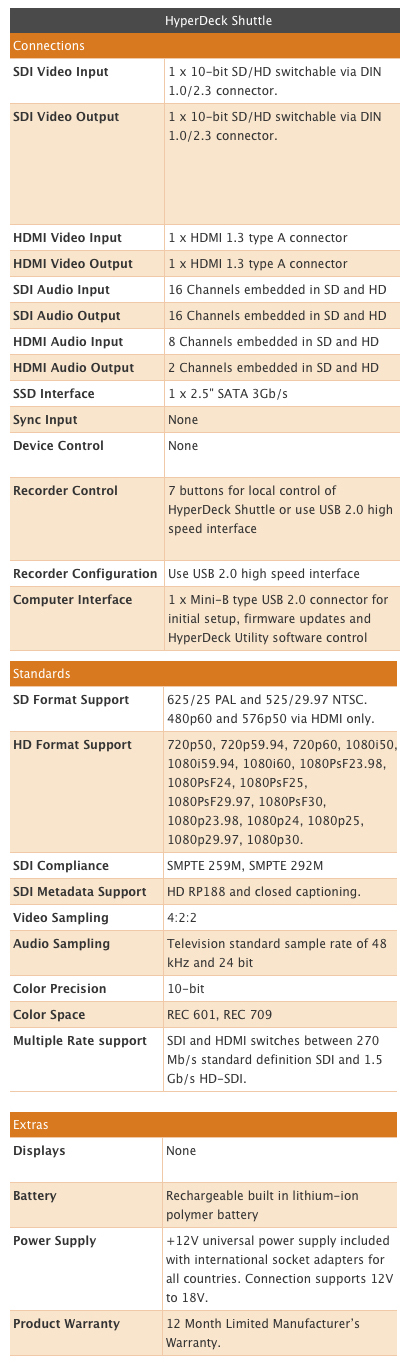
First of all, it doesn’t record in a range of selectable formats. So, there are no menus to dive in to as there is nothing to change. What the Hyperdeck Shuttle does is record 10-bit uncompressed video from your camera’s SDI or HDMI socket, plus eight channels of embedded audio in HDMI or 16 channels over SDI, and just bundles it up in a .mov QuickTime wrapper. It recognises whatever SD or HD format you are using

To give you some idea of file sizes, I recorded a minute of video using my Canon XF305 (at 50Mbps). When I checked on the CompactFlash cards the one minute (MXF file) was 391.7MB. 

One minute MXF file = 391.7MB

The same one minute on the HyperDeck Shuttle was 8.46GB.

One minute uncompressed video file = 8.46GB

It brought home just what my camera is capable of and how much compression my video is normally subjected to. If you intend to do a lot of post-production work on your video then recording straight to the HyperDeck Shuttle is a sure way of hanging on to all your data. You could always use the video on the CompactFlash for the offline edit, as proxy files or, at a pinch, backup.

But, with each minute taking up over 8Gb, I would only get about 15 minutes on a 128GB drive. So, you’ll have to plan ahead on how to handle the data. You could buy enough SSDs to get through a day or have a data wrangler on site to backup the SSDs as you go. Either way you will also need a large, fast drive to store all this data once you start editing.

The HyperDeck Shuttle does not come with a drive to record video so you must factor this into the cost. The review model I used came with a 2.5-inch (laptop size) 128GB Kingston Solid State Drive (SSD), which retails at around £120 (about $230 in the US), and format it using HFS+.

Kingston 128GB SSD - holds about 15mins of uncompressed video

Spinning disk drives are not recommended, as they are not capable of writing at the required speeds. In fact, not all SSDs are up to the job. If you go to the Blackmagic FAQ page you’ll find the current list of recommended 3Gbps SATA drives. At the time of writing these were:

1.              OCZ 240GB Vertex 3
2.              OCZ 480GB Vertex 3
3.              Crucial 256GB C300
4.              Kingston 64GB SSDNow V+
5.              Kingston 128GB SSDNow V+


Plugged In

The HyperDeck Shuttle comes with two HDMI sockets and two SDI sockets for video in and out. Whether you feed video in for recording by either HDMI or SDI, you can plug a monitor into either HDMI or SDI out socket. If you are of a nervous disposition you probably will want to plug in a field monitor to check on what is being recorded. However, there will be nothing on screen to confirm it is recording, how much it has recorded and how much disk space is remaining. This would have been useful – although if the SSD LED is lit, that indicates something is happening, and there is another LED to show that you are getting a video signal.

Power, HDMI in and out, SDI in and out and mini USB socket
(click on these images to enlarge)

How are you supposed to know when the SSD needs changing? Well, you need to keep an eye on the stop button. Once it starts flashing you have three minutes recording time left. Once the disk is full it obviously stops recording, the red recording light goes out and the green SSD indicator light stops flashing.

There is also a mini USB socket on the Shuttle. I wrongly assumed I could plug the Shuttle into my Mac and use it as a dock to review the video on the removable drive. In fact you will need to buy a separate dock for the SSD.

The USB is there to allow remote control of the device and to enable software upgrades. What I didn’t realise when I started the review was that this was something I needed to do.

When it first arrived I plugged in the HyperDeck Shuttle using an HDMI cable into my Canon XF305. But, the HyperDeck Shuttle was having none of it. It did not recognise the camera and/or video signal. It just would not record. After a call to Blackmagic they suggested the unit needed a software upgrade.

The first thing to do is go to the Blackmagic Site and you’ll see a link to download the Blackmagic Hyperdeck Utility.

Download for the utility to check for and install driver updates


I couldn’t see a download for a Windows PC, only for a Mac. The utility was only 13.4MB so didn’t take long to download and install.

The Blackmagic utility for software updates


The next thing to do was plug in the HyperDeck Shuttle into my Mac using a USB cable (not supplied) and then open the utility. The first couple of times they wouldn’t talk to each other but on the third attempt the utility suggested I needed to update the drivers. I clicked 'Yes' and the utility did the rest.

I unplugged the USB and tried recording with the HDMI – success. Everything now worked perfectly.

Now my next problem was how to test the SDI feed? My camera has the standard BNC connector and I have BNC to BNC cables in the office. But, the HyperDeck Shuttle has a mini coax SDI connector. I know I don’t have the correct cable – damn it. I realise manufacturers want to keep their prices low. But, I do expect them to include important cables. Anyway, fast forward and a few weeks later I have the correct cable and importantly a dock to plug the SSD into my Mac.

BNC to mini coax SDI connector 
You will also need a dock to transfer video from the SSD to your Mac 

After doing a Google search I see Blackmagic sell a cable pack for around £60/$90.

HyperDeck Shuttle plugged into my Canon XF305's HD-SDI socket

The final socket is for the 12v power. The unit can be run from the mains (adapter supplied) or from a built-in rechargeable lithium-ion polymer battery, which should last around one hour in record mode and 1.5 in playback.

Blackmagic warns (on the FAQ page) that: “Some drives consume twice as much power as other similar capacity ones from other brands.” So, you would definitely want to check how hungry the SSDs are that you intend to use. There is a four-LED battery indicator on the unit – once it goes out there are only four minutes of battery life remaining.

Button Up

There are seven buttons on the HyperDeck Shuttle. There are the usual media transport buttons: play, stop, rewind and forward, plus a record button and power on/off. The seventh button, DISP (display), doesn’t work at the moment, but it is promised that it will in a future software update.

Record - transport control - DISP  - power button


Get Mounted

In the Blackmagic blurb it says you can: “Take your HyperDeck Shuttle into the field, on set, to live events, or even on your extreme sport shoots.” If it does leave the building you will have to find a way to mount it onto your camera or tripod.

Out of the box it has no fixing plate or screw mounts. However, Blackmagic did announce a €69 mounting plate for the Hyperdeck Shuttle that should be available now. It provides multiple 1/4-inch and 3/8-inch mounting points. You could also use Velcro…

Mounting plate with lots of fixing points


In The Box

As I mentioned at the start, the unit is fairly minimalist. That could also be said for what was in the box – the HyperDeck Shuttle and power supply.

You will need:
  • Solid State Drives – big ones or lots of them.
  • A dock for the drives to transfer the footage to your editing/storage drive
  • An HDMI cable from camera to Shuttle [OR]
  • ... a BNC to mini coax SDI connector
  • A USB cable to connect the Shuttle to your computer for software updates
  • A mounting plate to attach it to your camera or articulating arm.

In Post

Once you've captured your video, it is straightforward to import the files into an editing system, such as Final Cut Pro, which can work with uncompressed material. Lower-power systems may have problems playing back uncompressed in real time, and unless you have the storage and bandwidth to cope with it, you may be limited to one or two streams of uncompressed.

I have a MacBook Pro 2.2Ghz Intel core i7 with 4GB of RAM - which struggled to play the uncompressed video in Final Cut Pro 7. The only thing to run smoothly was the spinning beach ball. However, this may be because my Mac has a spinning disk drive and not a SSD. If you want to work with uncompressed video, it is best to have a high-speed RAID storage array.

In theory, I could have edited direct from the SSD I had recorded onto. But, it was connected to my Mac via USB which caused a trickle of digits rather than the flood I needed. If only I had a dock with a Thunderbolt connection

However, you can transcode the files to any format you want to work with in the edit, such as ProRes 444 (if you want to maintain the highest quality), ProRes 422, or Avid DNxHD. Or do an offline edit at a lower bitrate and then conform the uncompressed in a suitably powerful finishing or grading system at the end. The pictures will be as good as the camera can produce.

Should you buy?

Broadcasters here in the UK have decided that 50Mbs recording is the minimum data to qualify as High Definition. Now this isn’t a problem for some cameras, but there are a few models that need a little extra help (such as the Sony EX1 and EX3). The Hyperdeck Shuttle will certainly keep the broadcasters happy.

However, this is a relatively big unit to strap to your camera (16cmx11cmx3cm) and weighs 660g with the SSD, but without the mounting plate. It is probably a little too large for fast moving situations, but would be great for location drama and studio set ups.

If you expect to do a lot of green screen shooting, compositing and colour correction then working uncompressed should ensure all the data latitude you’ll need with 10-bit colour precision and 4:2:2 video sampling.

It would be particularly well suited to a higher-end camcorder, such as Sony's PMW-F3, which records 35Mbps XDCAM internally, or the new Canon EOS C300, which records 50Mbps MXF files internally (like the XF305) – although the C300 only produces an 8-bit image it does output a 10-bit signal through the HD-SDI port so should work with the Shuttle with no problems. You could use the recorder with a camera that can record 12-bit video, but you'll only get 10-bits (you'd need a Codex, Cinedeck, Sony SRW-R1 or S.two recorder for 12-bit or above) and 4:2:2 (the Gemini 444, as the name suggests can do 10-bit 4:4:4 – as can all the 12-bit recorders).

The main reasons for not using a Shuttle would be its lack of a built-in monitor (if you don't have one or space to fit it), the fact that it doesn't currently tell you battery and memory status through the camera or other display, and, most crucially, if you'll be shooting and editing lots of material. Uncompressed video takes up such a large amount of space that this is almost certainly not the recorder you want if you are shooting an observational documentary, or editing on a low-to-mid-range system. SSDs will get cheaper (typically following Moore's law of half the price/twice the capacity every two years or so), bandwidth more available, and processors more powerful, so compression will become less necessary.

But given its price, even if you have to buy all the extras mentioned above, this is still a good value recorder, and will be really useful for many types of production, particularly commercials, promos and fashion shoots.

Christina Fox