JVC has launched two new large sensor (Super 35mm) Ultra HD
cameras with interchangeable Micro Four Thirds lens mounts. The GY-LS300
camcorder (pictured below), and the GW-SP100 miniature camera (above) and separate recording system, are
part of its new range of 4Kcam camcorders. The other two (the live streaming GY-HM200 and compact GY-HM170) use smaller 1/2.3-inch sensors.
Showing posts with label AVCHD. Show all posts
November 12, 2014
JVC's GY-HM200 + GY-HM170 4Kcam compact UHD camcorders
JVC Professional has launched its new 4Kcam (Ultra HD)
product line, including two new large sensor cameras (the GY-LS300 and GW-SP100 - dealt with elsewhere), and two smaller models: the GY-HM200, which includes HD
streaming and an SDI output; and the compact GY-HM170. All four should arrive
early in 2015.
The GY-HM200 (pictured above) and GY-HM170 are essentially the same, but the
HM200 will be the one to choose if you need to deliver breaking stories for
broadcast or the web via WiFi, internet or mobile (3G or 4G) connections, or if
you are working with other (SDI-based) broadcast equipment.
September 07, 2014
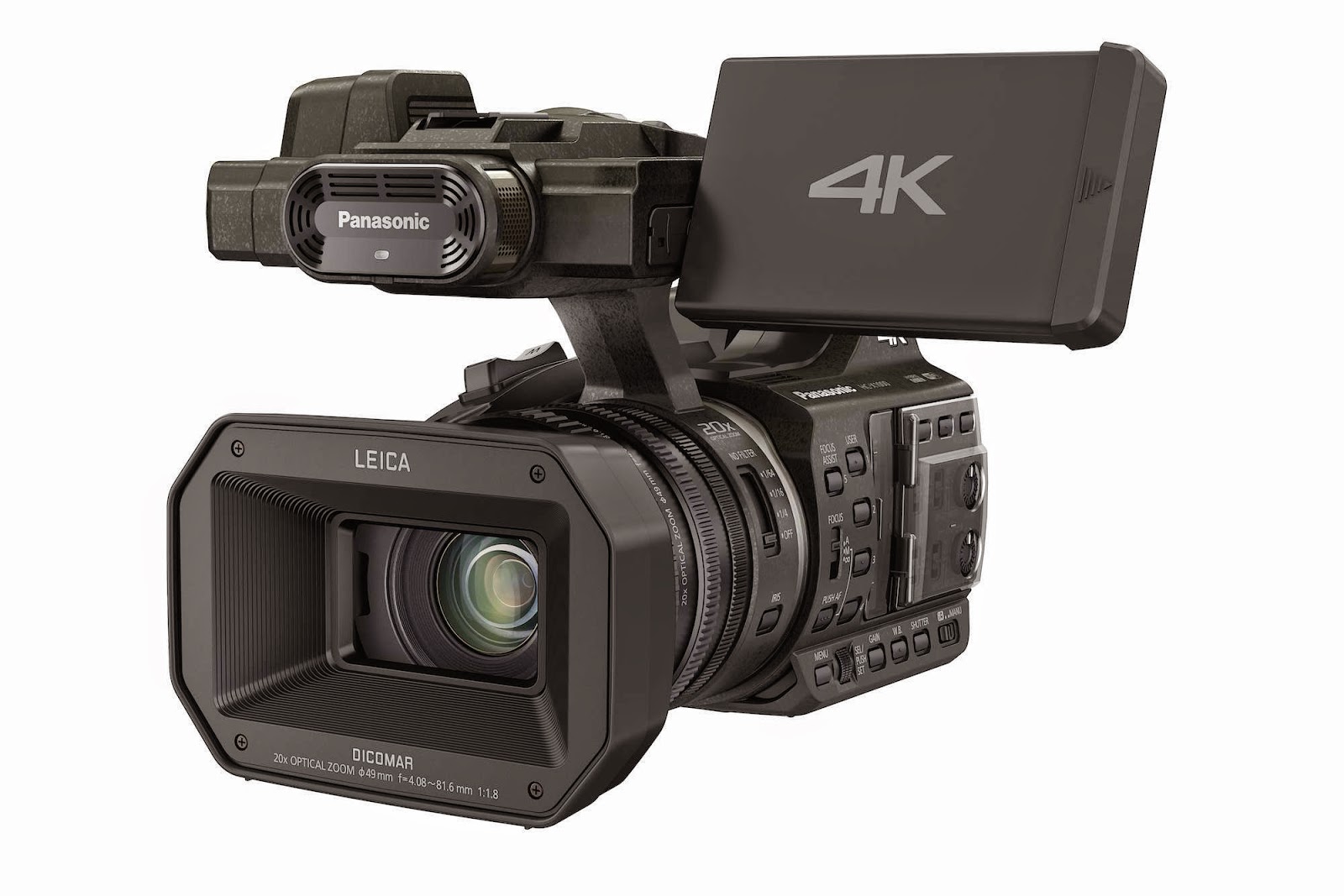
Panasonic HC-X1000 4K camcorder
Panasonic’s new HC-X1000 Ultra HD 4K camcorder is its first prosumer
model that can record 4K 60p/50p video on an SD card.
It can record both UHD (3840x2160) at 50/60p and Cinema 4K
(4096x2160) at 24p in MP4 at up to 150Mbps (50/60p) or 100Mbps (24p), plus .mov
or MP4 in HD, which can use all-Intra compression for a maximum bit rate of
200Mbps, as well as AVCHD (1080p) at up to 28Mbps. Even if you are shooting for
HD, recording in Ultra HD can be useful during editing, as you can then zoom in
to a one-quarter crop without losing any HD resolution, or pan across the
picture to follow movement.
April 03, 2013
Canon shows 4K to handheld at NAB
The annual NAB show in Las Vegas is America’s biggest
broadcast expo, and Canon is using the opportunity to demonstrate everything
from high-end 4K workflows to a three new handheld cameras that should be
useful for professional use.
You can get the full details on the small new XA25, XA20 and Vixia/Legria HF G30 camcorders on our Canon XF Notebook blog, but these palmcorders
should appeal because they promise to be an improvement on one of our favourite
small camcorders, the XA10. Plus, the XA25 includes HD-SDI output for
uncompressed signals for broadcast use.
March 13, 2013
JVC GY-HM70 shoulder camera
The new JVC GY-HM70 AVCHD camera should be of interest to
many of our readers, as our now-ancient (October 2010) post on AVCHD shoulder mounted camcorders is our most popular ever…
The GY-HM70 will ship in May, and has a list price of $1,995 (apparently the UK street price is likely to be under £1,200),
and some nice features, even if it doesn’t have XLR audio input.
It is designed principally for event production, and to make
it useful for covering long-form events, such as weddings or conferences, it
has hot-swappable batteries (pictured below - a first in this price bracket), so you can keep
shooting continuously, without interruption.
Being shoulder-mounted, it should
also be a lot more comfortable for long-term use than more compact cameras
(although it isn’t particularly big), and is reasonably light, weighing about 3kg
(6.7lb) with one battery attached.
It can record 1920x1080 HD at up to 50p or 60p in AVCHD
Progressive, to dual SDHC/SDXC memory cards (Class 4/6/10) at up to 28Mbps. It
will also shoot at 250 frames per second at 720x576 (for 50Hz/Pal production)
or 300fps at 720x480 (for 60Hz/NTSC countries), and offers 50/60i shooting or
SD at lower bit rates.
Interval recording in steps from one second up to 80
seconds is also an option, as are still images at up to 4000x3000-pixel
resolution. Stills in 12Megapixel can be shot at the same time as video or
stills can be shot at 2Megapixel resolution.
The camera should also be pretty useful in low light. It
uses JVC's Super LoLux technology to enhance image quality and offer more
accurate colour capture indoors or in dark situations (there is a minimum
illumination of 1lux, which is certainly good, but hardly exceptional).
The F1.2-F5.6 GT Lens has a 10x optical zoom, plus a 16x
“dynamic zoom” that only works with the optical image stabilisation turned off
and makes use of the overabundance of pixels on the sensor by reducing from
5.4Mpixels to 2.07Mpixels (there is also a 200x digital zoom).
The lens delivers
a not-particularly wide wide-angle of 29.5mm – to 476mm if dynamic zoom used (35mm-equivalent),
and was developed specifically for the 1/2.3-inch 12Megapixel back-illuminated
CMOS sensor (apparently the same sensor used in JVC’s GY-HMQ10 small 4K
handheld camcorder), which is claimed to deliver “high resolution, high
sensitivity, and excellent colour reproduction.”
The camera features manual or auto focus (with focus assist),
manual iris and shutter, manual or automatic white balance, and optical image
stabilization.
There is a 3-inch 16:9 230K-pixel Touch Screen LCD display
plus a 0.24-inch LCOS 16:9 260K-pixel colour viewfinder; an internal stereo
microphone (plus a mini-jack microphone input); remote-control input; while
outputs include an HDMI Mini connector and RCA video and audio ports. It comes
with an AC adapter (AP-V20); battery pack (BN-VF823); composite/audio cable
(RCA x 3) and USB cable.
By David Fox
November 05, 2012
Panasonic AF100A/AF101A update
It seemed as if Panasonic had forgotten its AF100/AF101
Micro Four Thirds-based AVCCAM camcorder, but it has finally announced an
update: the AG-AF100A / AG-AF101A.
The new A series looks identical to the existing model, but
will now be able to record 1080p 50/60 (at up to 28Mbps) internally and will
produce a 10-bit 4:2:2 output via HD-SDI for recording on an external recorder
(compared to 8-bit output on the previous model).
Although this means that the AF100/101 hasn’t been totally
forgotten, it is a rather limited upgrade. Given that Panasonic’s own GH3
stills camera can record 1080p 60p/50 at 50Mbps IPB and 24p at 72Mbps ALL-I
internally, it seems a shame that the camcorder should lag so far behind a much
cheaper stills camera.
Admittedly, the new GH3 only has 8-bit 4:2:0 output via HDMI
(although given what hacks have done to expand the recording options on the
existing GH2, one would hope the GH3 will be similarly tweakable).
The AF100A/AF101A also gets an expanded focus assist
function, which enlarges the centre of the displayed image, and 2.39:1 (cinema
scope size) safety zone marker.
Besides the GH2 and GH3, the other option for anyone with an
investment in Micro Four Thirds lenses is the upcoming MFT version of
Blackmagic Design’s Cinema Camera. It has certain advantages over the stills
cameras in terms of faster connections (Thunderbolt), higher bitrate recording
and smartphone-like controls (although the GH3 will be controllable from a
smartphone), but is not as ergonomically usable as the AF100/101 (nor have its
dual XLR audio inputs). However, it does cost less.
The AG-AF100A (the US version) and AG-AF101A (European version) will be available later this
month with a list price of €4,150 excluding VAT (about £3,300 or $5,300).
By David Fox
August 29, 2012
Canon EOS C100 Super35 camera
Canon has announced a new entry-level HD large-sensor camera to compliment its existing C300 and the upcoming 4k-capable C500. The C100 records about half the data rate of the C300, but then it will cost about half the price….
The EOS C100 digital video camera is aimed at budget filmmaking. It records 1920x1080 HD video in the AVCHD codec (24Mbps, 4:2:0) to dual SD cards, for up to 12 hours recording on two 64GB cards.
Higher quality formats will require an external recorder, such as the Atomos Ninja 2 (via the C100’s uncompressed HDMI port – no HD-SDI, but the HDMI is lockable).
It has three seconds of cache recording, so you can capture what happened before you pressed the record button.
By replacing the C300’s Compact Flash recording, the C100 shrinks to about 85% of the size, and weighs 1020g (410g less than the C300).
It has push auto iris and one-shot auto focus – or full manual focus and exposure control, but it is being touted as being optimised for use by a single operator, although these auto functions are not available if shooting with Canon’s cinema lenses.
It also has a rotatable 3.5-inch LCD control panel, which is built-in rather than an add-on (as it is on the C300), plus a high-resolution electronic viewfinder (EVF). Thankfully, there are built-in ND filters (2, 4 and 6 stops), which gives it a key advantage over Sony’s NEX-FS100 and all DSLRs).
For audio, it has dual XLR inputs (on the detachable handle), recording linear PCM two-channel audio or Dolby digital two-channel audio.
Super35mm sensor
It promises “reduced rolling shutter artefacts” in interlaced mode, enhanced gamma modes, cinematic depth of field (from the Super35mm/APS-C sized sensor), and “excellent low-light performance”, which should be achievable as it appears to use the same 16:9 CMOS sensor as the C300 (which performs very well in low light and delivers excellent dynamic range of a consistent 12 stops through the ISO range).
It captures 8.4 megapixels, with individual Red, Green, and Blue channels for each full HD 1920x1080 frame, and provides an ISO range of from 320 to 20,000 for work in low light with “minimal picture noise”. It also uses Canon’s DIGIC DV III image processor for better colour rendition.
Frame rates
There are multiple recording modes, resolutions, and frame rates (60i, 50i, PF30, 25p, PF24 and 24p), plus enhanced gamma modes (including Wide Dynamic Range Gamma and Canon Log Gamma) for a peak dynamic range of 800% and wide exposure latitude for creative post-production image processing, colour correction, and contrast manipulation (although if you are recording AVCHD with 4:2:0 colour space, you lose a lot of that).
The C100 has a similar modular design to the C300, so you can add accessories to suit your shooting style. A removable side-mounted rotating grip with start/stop button and miniature "joystick" menu control provides almost SLR-like operation.
A detachable handle on top of the C100 includes dual XLR connectors, built-in stereo microphone, a bracket for an external microphone, audio-input level adjustments, and a tally light.
It can record to both SD cards simultaneously or relay-record from one card to the other, but also outputs uncompressed 4:2:2 HD via HDMI, including superimposed time code and 2:3 pull-down marker information. The HDMI is lockable, and if you’re using external recorders you really need this. Additional outputs include a USB connector and stereo headphone jack.
EF-mount lenses
The C100 can be fitted with EF-mount lenses (of which Canon makes more than 70 zoom and prime lenses in its EF, EF-S and EF Cinema lens line ups, with other lenses available from third-party manufacturers).
There are now seven EF Cinema lens models, which are more suited to video use than stills lenses.
There are four zooms: the compact, lightweight CN-E15.5-47mm T2.8 L wide-angle zoom and the CN-E30-105mm (pictured above) T2.8 L telephoto cinema zoom (available in EF and PL versions – with a list price of $24,500); the CN-E14.5-60mm T2.6 L wide-angle zoom and CN-E30-300mm T2.95-3.7 L telephoto zoom (also EF and PL).
The primes are: the CN-E24mm T1.5 L, CN-E50mm T1.3 L, and CN-E85mm T1.3 L prime lenses. Two new cinema primes, the 14mm T3.1 and 135mm T2.2 (pictured), were announced today for release in the Spring.
Price and availability
The EOS C100 should be available in November, with a list price of $7,999 – our local dealers are pricing it at about £4,160 + VAT (just under £5,000 inclusive) – about €5,250 or $6,500 – so it’s a little more expensive than an FS100, probably its nearest rival (but considering what it offers, probably better value).
By David Fox
The EOS C100 digital video camera is aimed at budget filmmaking. It records 1920x1080 HD video in the AVCHD codec (24Mbps, 4:2:0) to dual SD cards, for up to 12 hours recording on two 64GB cards.
Higher quality formats will require an external recorder, such as the Atomos Ninja 2 (via the C100’s uncompressed HDMI port – no HD-SDI, but the HDMI is lockable).
It has three seconds of cache recording, so you can capture what happened before you pressed the record button.
By replacing the C300’s Compact Flash recording, the C100 shrinks to about 85% of the size, and weighs 1020g (410g less than the C300).
It has push auto iris and one-shot auto focus – or full manual focus and exposure control, but it is being touted as being optimised for use by a single operator, although these auto functions are not available if shooting with Canon’s cinema lenses.
It also has a rotatable 3.5-inch LCD control panel, which is built-in rather than an add-on (as it is on the C300), plus a high-resolution electronic viewfinder (EVF). Thankfully, there are built-in ND filters (2, 4 and 6 stops), which gives it a key advantage over Sony’s NEX-FS100 and all DSLRs).
For audio, it has dual XLR inputs (on the detachable handle), recording linear PCM two-channel audio or Dolby digital two-channel audio.
Super35mm sensor
It promises “reduced rolling shutter artefacts” in interlaced mode, enhanced gamma modes, cinematic depth of field (from the Super35mm/APS-C sized sensor), and “excellent low-light performance”, which should be achievable as it appears to use the same 16:9 CMOS sensor as the C300 (which performs very well in low light and delivers excellent dynamic range of a consistent 12 stops through the ISO range).
It captures 8.4 megapixels, with individual Red, Green, and Blue channels for each full HD 1920x1080 frame, and provides an ISO range of from 320 to 20,000 for work in low light with “minimal picture noise”. It also uses Canon’s DIGIC DV III image processor for better colour rendition.
Frame rates
There are multiple recording modes, resolutions, and frame rates (60i, 50i, PF30, 25p, PF24 and 24p), plus enhanced gamma modes (including Wide Dynamic Range Gamma and Canon Log Gamma) for a peak dynamic range of 800% and wide exposure latitude for creative post-production image processing, colour correction, and contrast manipulation (although if you are recording AVCHD with 4:2:0 colour space, you lose a lot of that).
The C100 has a similar modular design to the C300, so you can add accessories to suit your shooting style. A removable side-mounted rotating grip with start/stop button and miniature "joystick" menu control provides almost SLR-like operation.
A detachable handle on top of the C100 includes dual XLR connectors, built-in stereo microphone, a bracket for an external microphone, audio-input level adjustments, and a tally light.
It can record to both SD cards simultaneously or relay-record from one card to the other, but also outputs uncompressed 4:2:2 HD via HDMI, including superimposed time code and 2:3 pull-down marker information. The HDMI is lockable, and if you’re using external recorders you really need this. Additional outputs include a USB connector and stereo headphone jack.
EF-mount lenses
The C100 can be fitted with EF-mount lenses (of which Canon makes more than 70 zoom and prime lenses in its EF, EF-S and EF Cinema lens line ups, with other lenses available from third-party manufacturers).
There are now seven EF Cinema lens models, which are more suited to video use than stills lenses.
There are four zooms: the compact, lightweight CN-E15.5-47mm T2.8 L wide-angle zoom and the CN-E30-105mm (pictured above) T2.8 L telephoto cinema zoom (available in EF and PL versions – with a list price of $24,500); the CN-E14.5-60mm T2.6 L wide-angle zoom and CN-E30-300mm T2.95-3.7 L telephoto zoom (also EF and PL).
The primes are: the CN-E24mm T1.5 L, CN-E50mm T1.3 L, and CN-E85mm T1.3 L prime lenses. Two new cinema primes, the 14mm T3.1 and 135mm T2.2 (pictured), were announced today for release in the Spring.
Price and availability
The EOS C100 should be available in November, with a list price of $7,999 – our local dealers are pricing it at about £4,160 + VAT (just under £5,000 inclusive) – about €5,250 or $6,500 – so it’s a little more expensive than an FS100, probably its nearest rival (but considering what it offers, probably better value).
By David Fox
August 22, 2012
Scene files for Panasonic pro cameras
Panasonic users can change the look of the images captured by their P2 HD and AVCCAM HD camcorder using freely downloadable scene files from the company’s website.
The files can change lots of aspects of how a camera performs, from different frame rate to wide-ranging changes in the colour correction matrix and gamma used to specific create looks without having to manually change individual parameters or experiment to get the look you want. Panasonic’s selection of customized scene files each contain a unique look that can be stored in the camera or read from the camera's built-in SD Memory Card slot.
The latest files available are 18 for each of the following cameras: the AG-AC130 and AG-AC160 AVCCAM HD handhelds; the AG-HPX250 P2 HD handheld; the AG-AF100/AF101 large sensor HD cinema camera; and the AG-HPX370 (pictured above) and AJ-HPX3100 P2 HD shoulder-mount camcorders.
The 18 files come in three packages (styles, filmic, effects), each containing six files per download – except for the AJ-HPX3100, for which the files must be downloaded individually. If you have an AF101, you apparently have to change the camera name to AF101E in each of the three styles text entry (according to a comment on Creative Cow) - something similar might also apply to other variants, like the HPX371.
The Styles package includes: Clean, Portrait, Rich, SoftB (similar to using a black diffusion filter), SoftW (like a white diffusion filter), and Stylin (a bright, punchy look).
The Filmic package, for the film look, includes: Comedy, Drama (darker, grittier, more contrast), Hollywood, Super8, Flat (for grading in post), and Stark (for that Iron Man look… sorry, no, apparently for a highly stylized, brighter, more contrasty, washed out look, so more ‘Tony Stark’ than ‘Iron Man’).
The Effects package includes: DSLR, Ghosty (green and blue), Cold (blue), Night (darker blue), Hot (dusty), and Boost (for shooting in low light).
You’ll also find scene files for other Panasonic cameras on the page: with 33 for the AJ-HPX2700, AJ-HPX3700 and AJ-HPX3000; 31 scene files for the AJ-HPX2000; 16 for the AG-HPX500; 18 for the AG-HPX170 and AG-HPX300; and 20 for the venerable AG-HVX200/HVX200A.
By David Fox
The files can change lots of aspects of how a camera performs, from different frame rate to wide-ranging changes in the colour correction matrix and gamma used to specific create looks without having to manually change individual parameters or experiment to get the look you want. Panasonic’s selection of customized scene files each contain a unique look that can be stored in the camera or read from the camera's built-in SD Memory Card slot.
The latest files available are 18 for each of the following cameras: the AG-AC130 and AG-AC160 AVCCAM HD handhelds; the AG-HPX250 P2 HD handheld; the AG-AF100/AF101 large sensor HD cinema camera; and the AG-HPX370 (pictured above) and AJ-HPX3100 P2 HD shoulder-mount camcorders.
The 18 files come in three packages (styles, filmic, effects), each containing six files per download – except for the AJ-HPX3100, for which the files must be downloaded individually. If you have an AF101, you apparently have to change the camera name to AF101E in each of the three styles text entry (according to a comment on Creative Cow) - something similar might also apply to other variants, like the HPX371.
The Styles package includes: Clean, Portrait, Rich, SoftB (similar to using a black diffusion filter), SoftW (like a white diffusion filter), and Stylin (a bright, punchy look).
The Filmic package, for the film look, includes: Comedy, Drama (darker, grittier, more contrast), Hollywood, Super8, Flat (for grading in post), and Stark (for that Iron Man look… sorry, no, apparently for a highly stylized, brighter, more contrasty, washed out look, so more ‘Tony Stark’ than ‘Iron Man’).
The Effects package includes: DSLR, Ghosty (green and blue), Cold (blue), Night (darker blue), Hot (dusty), and Boost (for shooting in low light).
You’ll also find scene files for other Panasonic cameras on the page: with 33 for the AJ-HPX2700, AJ-HPX3700 and AJ-HPX3000; 31 scene files for the AJ-HPX2000; 16 for the AG-HPX500; 18 for the AG-HPX170 and AG-HPX300; and 20 for the venerable AG-HVX200/HVX200A.
Remember the HVX200 - It's good to see Panasonic still does...
By David Fox
August 17, 2012
Sony NEX-EA50 NXCAM camcorder
Sony’s new NEX-EA50 answers a demand that many camcorder users have for a large-sensor, low(ish)-cost camcorder you can use on your shoulder without having to buy some sort of rig. Certainly, our most popular post ever is one from two years ago on Shoulder-mounted AVCHD cameras – which is exactly what this is…
As the newest addition to the NXCAM range, the NEX-EA50 has a new form factor that should be more comfortable to hold however you like to shoot.
When its shoulder pad is extended, the camcorder can be balanced on the shoulder for extra stability, making it a lot easier to hold for long shooting times. When the shoulder pad is in its original position, the camcorder is compact enough for any style of handheld use.
Many of its specifications seem similar to the NEX-FS100, but it doesn't appear to use the same sensor. The camcorder, due to ship in October, features a large format sensor, E-mount lens system, shooting Full HD movies (and high-quality still photos), but is promised to meet a “more affordable price point than ever before” - about £2,700 - Creative Video has it for £2,499 + VAT, which is less than €3,200/$4,000.
The Exmor APS-C/Super35mm-sized HD CMOS sensor is claimed to offer low noise and high sensitivity in low light conditions. It also enables 1080 progressive and interlace recording with 50/60Hz selection at 50p/25p/50i or 60p/30p/24p/60i. It records AVCHD 4:2:0 at up to 28Mbps. It can also record standard definition MPEG-2.
“This all-in-one camcorder brings a new level of creativity to a wider range of professional users than ever before,” said Bill Drummond, Sony Europe. “It combines affordability and high performance with a range of versatile, professional features for many applications, including event production, budget movie making and corporate production.”
It will capture 16.1 megapixel still pictures and has a built-in mechanical shutter so it can deliver high shutter speeds while capturing stills.
The camera can be used with any Sony E-mount lens, which enables auto focus, auto exposure and stabilisation during shooting. It has a short flange back distance, so it is possible to attach Sony A-mount lenses via the LA-EA2 lens mount adapter, or a wide range of other manufacturer’s lenses using third-party adapters.
The NEX-EA50 comes with the newly developed Power Zoom E-mount lens E PZ 18-200mm F3.5-6.3 OSS SELP18200. The 11x zoom includes auto focus, continuous variable iris and Optical Steady Shot image stabilisation with Active Mode, which should give a more stable shot.
The lens is electronically controlled via either the zoom rocker lever on the camcorder grip or the top handle, offering either a constant zoom speed or smooth, slow zoom.
Other camera functions include: two-channel XLR audio (an ECM-XM1 Shotgun microphone is included with the NEX-EA50H); Linear PCM audio; time code; user bit; built-in GPS; six assignable buttons; HDMI Type A, component (3xRCA) and A/V (RCA) outputs; 3.5-inch 1920x480 LCD; and Face Detection autofocus.
For recording, Sony’s HXR-FMU128 (128GB) flash memory unit (which costs about £600/€750/$1000) can dock directly to the camcorder for simultaneous backup recording. The camcorder is also compatible with Sony’s new Mirroring Memory Stick (MS-PX64/32/16), the world’s first memory card with mirroring. This enables the card to deliver higher reliability and data security through a dual recording (mirroring) function. The PX Series cards will be available from September, in 16GB, 32GB and 64GB versions. It can also record to SD cards.
By David Fox
As the newest addition to the NXCAM range, the NEX-EA50 has a new form factor that should be more comfortable to hold however you like to shoot.
When its shoulder pad is extended, the camcorder can be balanced on the shoulder for extra stability, making it a lot easier to hold for long shooting times. When the shoulder pad is in its original position, the camcorder is compact enough for any style of handheld use.
Many of its specifications seem similar to the NEX-FS100, but it doesn't appear to use the same sensor. The camcorder, due to ship in October, features a large format sensor, E-mount lens system, shooting Full HD movies (and high-quality still photos), but is promised to meet a “more affordable price point than ever before” - about £2,700 - Creative Video has it for £2,499 + VAT, which is less than €3,200/$4,000.
The Exmor APS-C/Super35mm-sized HD CMOS sensor is claimed to offer low noise and high sensitivity in low light conditions. It also enables 1080 progressive and interlace recording with 50/60Hz selection at 50p/25p/50i or 60p/30p/24p/60i. It records AVCHD 4:2:0 at up to 28Mbps. It can also record standard definition MPEG-2.
“This all-in-one camcorder brings a new level of creativity to a wider range of professional users than ever before,” said Bill Drummond, Sony Europe. “It combines affordability and high performance with a range of versatile, professional features for many applications, including event production, budget movie making and corporate production.”
It will capture 16.1 megapixel still pictures and has a built-in mechanical shutter so it can deliver high shutter speeds while capturing stills.
The camera can be used with any Sony E-mount lens, which enables auto focus, auto exposure and stabilisation during shooting. It has a short flange back distance, so it is possible to attach Sony A-mount lenses via the LA-EA2 lens mount adapter, or a wide range of other manufacturer’s lenses using third-party adapters.
The NEX-EA50 comes with the newly developed Power Zoom E-mount lens E PZ 18-200mm F3.5-6.3 OSS SELP18200. The 11x zoom includes auto focus, continuous variable iris and Optical Steady Shot image stabilisation with Active Mode, which should give a more stable shot.
The lens is electronically controlled via either the zoom rocker lever on the camcorder grip or the top handle, offering either a constant zoom speed or smooth, slow zoom.
Other camera functions include: two-channel XLR audio (an ECM-XM1 Shotgun microphone is included with the NEX-EA50H); Linear PCM audio; time code; user bit; built-in GPS; six assignable buttons; HDMI Type A, component (3xRCA) and A/V (RCA) outputs; 3.5-inch 1920x480 LCD; and Face Detection autofocus.
For recording, Sony’s HXR-FMU128 (128GB) flash memory unit (which costs about £600/€750/$1000) can dock directly to the camcorder for simultaneous backup recording. The camcorder is also compatible with Sony’s new Mirroring Memory Stick (MS-PX64/32/16), the world’s first memory card with mirroring. This enables the card to deliver higher reliability and data security through a dual recording (mirroring) function. The PX Series cards will be available from September, in 16GB, 32GB and 64GB versions. It can also record to SD cards.
By David Fox
April 03, 2012
Tiny Sony HXR-NX30 HD camcorder
The new Sony HXR-NX30 is its smallest, lightest handheld professional camcorder. It uses Sony’s Balanced Optical SteadyShot image stabilisation to make it more usable for handheld shooting. It can also take care of playout, as it has a built-in projector.
Conventional image stabilisation systems typically float an individual lens element with a motor drive to compensate for camera shake. The Balanced Optical SteadyShot combines the entire lens and image sensor assembly into one floating element that moves as a unit, which it claims considerably reduces the shaking effect caused by normal motion during shooting (watch the promo video below for a good explanation).
“This high-quality yet easy-to-use camcorder is an extremely versatile field production tool,” said Bill Drummond, Strategic Marketing Manager, Sony Europe. “It’s perfect for videographers, journalists, educational establishments or corporate users, for shooting in many different situations where other stabilisation equipment is not practical, such as on-board a vehicle or in a crowd”.
The NXCAM camcorder should be available in June for about £1,900/€2,300/$2,500, and records AVCHD 1920x1080 images using a Carl Zeiss Vario-Sonnar T* lens (going from a reasonably wide 26mm to 260mm - 35mm equivalent) and a single 1/2.88-inch Exmor CMOS image sensor. It outputs 1080/50p, 25p, 50i and 720/50p (or 60p, 30p, 24p, 60i and 720/60p for the 60Hz version).
It has 96GB of internal memory (about 8.75 hours at the highest HD recording quality – 28Mbps), with a dual slot that accepts either SD or Memory Stick PRO Duo media cards for additional capacity.
The built-in video projector allows playback on any flat surface, producing an image of 100 inches at a 5m distance, useful for reviewing rushes in the field or on set, if a monitor is not available. It also has a built-in video light (just above the lens) and an infra-red (Night Shot) mode.
For audio, the HXR-NX30E has a detachable XLR unit (which also acts as a handle), record level control, the option of Linear PCM audio recording, time code and the ability to set time code on multiple cameras via an infrared remote control.
By David Fox
-------------------
In response to comments - some setting is currently preventing us from adding a comment below - so we're adding this comment here:
Dave,
The HXR-NX30 is certainly light (under 2lb/800g with battery), and it looks like the stabiliser is as good as they get on a small camcorder.
However, it doesn’t appear to have any built-in ND filters, never mind automatic ones (it will probably adjust the shutter for you – although that is rarely a good thing for your image quality…).
Very few small camcorders have any sort of built-in ND filters. Some, such as our Canon XF100 offer negative gain (which they call an ND filter), which at least means it doesn’t mess with the shutter speed. You could add a variable ND filter.
If the main attraction of this camera is the stabiliser, and you don’t need the XLR audio inputs and some pro features like timecode, then save some money and have a look at the consumer version, the Sony HDR-PJ760 (see www.cnet.com.au/sony-handycam-hdr-pj760-339335621.htm for a review with video showing the stabiliser in action).
The camera set up we use when we need to travel light (whether on vacation or doing interviews) is our little Panasonic HDC-TM700 camcorder (superseded by the slightly upgraded 900 series), which is a three-chip camcorder and delivers very good pictures.
It does have a built-in stabiliser, but not as advanced as the Sony, but for extra stability we use a very lightweight Manfrotto 560B monopod (which has three little feet and the ability to pan the camera smoothly, with a tilt head), which should cost under $150. When we need XLR audio we use a small add-on BeachTek box with two inputs (which sits beneath the camcorder on the monopod).
Hope this helps.
Conventional image stabilisation systems typically float an individual lens element with a motor drive to compensate for camera shake. The Balanced Optical SteadyShot combines the entire lens and image sensor assembly into one floating element that moves as a unit, which it claims considerably reduces the shaking effect caused by normal motion during shooting (watch the promo video below for a good explanation).
“This high-quality yet easy-to-use camcorder is an extremely versatile field production tool,” said Bill Drummond, Strategic Marketing Manager, Sony Europe. “It’s perfect for videographers, journalists, educational establishments or corporate users, for shooting in many different situations where other stabilisation equipment is not practical, such as on-board a vehicle or in a crowd”.
The NXCAM camcorder should be available in June for about £1,900/€2,300/$2,500, and records AVCHD 1920x1080 images using a Carl Zeiss Vario-Sonnar T* lens (going from a reasonably wide 26mm to 260mm - 35mm equivalent) and a single 1/2.88-inch Exmor CMOS image sensor. It outputs 1080/50p, 25p, 50i and 720/50p (or 60p, 30p, 24p, 60i and 720/60p for the 60Hz version).
It has 96GB of internal memory (about 8.75 hours at the highest HD recording quality – 28Mbps), with a dual slot that accepts either SD or Memory Stick PRO Duo media cards for additional capacity.
The built-in video projector allows playback on any flat surface, producing an image of 100 inches at a 5m distance, useful for reviewing rushes in the field or on set, if a monitor is not available. It also has a built-in video light (just above the lens) and an infra-red (Night Shot) mode.
For audio, the HXR-NX30E has a detachable XLR unit (which also acts as a handle), record level control, the option of Linear PCM audio recording, time code and the ability to set time code on multiple cameras via an infrared remote control.
By David Fox
-------------------
In response to comments - some setting is currently preventing us from adding a comment below - so we're adding this comment here:
Dave,
The HXR-NX30 is certainly light (under 2lb/800g with battery), and it looks like the stabiliser is as good as they get on a small camcorder.
However, it doesn’t appear to have any built-in ND filters, never mind automatic ones (it will probably adjust the shutter for you – although that is rarely a good thing for your image quality…).
Very few small camcorders have any sort of built-in ND filters. Some, such as our Canon XF100 offer negative gain (which they call an ND filter), which at least means it doesn’t mess with the shutter speed. You could add a variable ND filter.
If the main attraction of this camera is the stabiliser, and you don’t need the XLR audio inputs and some pro features like timecode, then save some money and have a look at the consumer version, the Sony HDR-PJ760 (see www.cnet.com.au/sony-handycam-hdr-pj760-339335621.htm for a review with video showing the stabiliser in action).
The camera set up we use when we need to travel light (whether on vacation or doing interviews) is our little Panasonic HDC-TM700 camcorder (superseded by the slightly upgraded 900 series), which is a three-chip camcorder and delivers very good pictures.
It does have a built-in stabiliser, but not as advanced as the Sony, but for extra stability we use a very lightweight Manfrotto 560B monopod (which has three little feet and the ability to pan the camera smoothly, with a tilt head), which should cost under $150. When we need XLR audio we use a small add-on BeachTek box with two inputs (which sits beneath the camcorder on the monopod).
Hope this helps.
New Sony NEX-FS700 4K camcorder
Sony has unveiled a new higher-resolution, higher framerate camcorder for about £6,000/$8,000/€7,500 + tax (or about a thousand more with 18-200mm lens).
The NEX-FS700 will record full HD at up to 200 (50Hz) or 240 (60Hz) frames per second for 4x or 10x slow motion (depending on your base rate) and will eventually be able to record 4K (with a firmware upgrade and on an external recorder).
The FS700 improves in several ways on the existing NEX-FS100, and compares favourably with JVC’s new small-sensor 4K GY-HMQ10 camcorder (although the FS700 is about twice the price).
It has a Super 35mm (APS-C sized) CMOS sensor using a new 4K Exmor design with 11.6 million pixels (which can also be used for stills). It also has 3G HD-SDI output (which allows it record 4K externally) and built-in ND filters (unlike the FS100). There are also more creative options and shooting styles, as well as enhanced ergonomics, based on customer feedback.
“The NEX-FS700 opens the door to a new world of creative shooting,” said Bill Drummond, Strategic Marketing Manager, Sony Europe. “You can record beautiful high speed Full-HD movies with the freedom of choosing interchangeable lenses. The NEX-FS700, with its super slow motion mode, is ideal for pop promos, commercials and documentaries as well as sports and a variety of events productions.”
It doesn’t look like it will have the creative control of the PMW-F3, but the higher frame rates and/or resolution will probably make it more useful for many types of production – although once you factor in the cost of an external recorder, it may not be that much cheaper than the F3.
The it can deliver HD at 100/120 and 200/240 frames per second in bursts of 8 or 16 seconds respectively. It will also do 400/480fps HD at a lower bitrate and 800/960fps at reduced resolution and bitrate – the camera is 50hz/60hz switchable.
The NXCAM’s E-Mount can be fitted with virtually any SLR or DSLR 35mm lenses, thanks to inexpensive adapters, without optical degradation. With the FS100, the design hadn’t enough room to allow the fitting of neutral density filters, which are important to allow those wide-open F stops that give shallow depth of field, but the FS700 has a newly designed ND filter wheel that rotates across the sensor like a turret, with positions for Clear, 1/4 (2 Stop), 1/16 (4 Stop), and 1/64 (6 Stop).
The NEX-FS700’s 3GHD-SDI and HDMI connectors can output full HD 50p and 60p, plus 60i, 24p, 25p or 30p frame rates with embedded time code and audio. 3G HD-SDI can output native 23.98, 25, 29.97 progressive signals, but users can choose to output PsF over the 3G HD-SDI, and virtually any external recorder can be connected. A future firmware upgrade will enable the NEX-FS700 to output 4K bit-stream data over 3G HD-SDI when used with an optional Sony 4K recorder, which will no doubt make it a useful addition to the new 4K F65 as a B-roll or crash camera. Of course, the F65, of which Sony has now sold about 500 worldwide, is an 8K sensor, making use of all those extra pixels to deliver much higher quality, whereas the 4K sensor on the FS700 is ideally used for HD (in the same way as the 4K sensor on the Canon C300).
Users can save up to 99 camcorder profile settings on an MS or SD memory card and copy the same setting to multiple units. It also uses the MS or SD cards for internal media recording at AVCHD 24Mbps or 28Mbps.
The handle includes an “active grip” with four buttons for commonly used functions – expanded focus, auto iris, still capture and Recording Start/Stop – so handheld users can operate the camcorder more easily than the FS100. Function buttons have also bee enlarged to make operating easier, even while wearing gloves.
The NEX-FS700 is planned to be available in June 2012.
Introducing the Sony NEX-FS700 from Sony Professional on Vimeo.
By David Fox
The FS700 improves in several ways on the existing NEX-FS100, and compares favourably with JVC’s new small-sensor 4K GY-HMQ10 camcorder (although the FS700 is about twice the price).
It has a Super 35mm (APS-C sized) CMOS sensor using a new 4K Exmor design with 11.6 million pixels (which can also be used for stills). It also has 3G HD-SDI output (which allows it record 4K externally) and built-in ND filters (unlike the FS100). There are also more creative options and shooting styles, as well as enhanced ergonomics, based on customer feedback.
“The NEX-FS700 opens the door to a new world of creative shooting,” said Bill Drummond, Strategic Marketing Manager, Sony Europe. “You can record beautiful high speed Full-HD movies with the freedom of choosing interchangeable lenses. The NEX-FS700, with its super slow motion mode, is ideal for pop promos, commercials and documentaries as well as sports and a variety of events productions.”
It doesn’t look like it will have the creative control of the PMW-F3, but the higher frame rates and/or resolution will probably make it more useful for many types of production – although once you factor in the cost of an external recorder, it may not be that much cheaper than the F3.
The it can deliver HD at 100/120 and 200/240 frames per second in bursts of 8 or 16 seconds respectively. It will also do 400/480fps HD at a lower bitrate and 800/960fps at reduced resolution and bitrate – the camera is 50hz/60hz switchable.
The NXCAM’s E-Mount can be fitted with virtually any SLR or DSLR 35mm lenses, thanks to inexpensive adapters, without optical degradation. With the FS100, the design hadn’t enough room to allow the fitting of neutral density filters, which are important to allow those wide-open F stops that give shallow depth of field, but the FS700 has a newly designed ND filter wheel that rotates across the sensor like a turret, with positions for Clear, 1/4 (2 Stop), 1/16 (4 Stop), and 1/64 (6 Stop).
The NEX-FS700’s 3GHD-SDI and HDMI connectors can output full HD 50p and 60p, plus 60i, 24p, 25p or 30p frame rates with embedded time code and audio. 3G HD-SDI can output native 23.98, 25, 29.97 progressive signals, but users can choose to output PsF over the 3G HD-SDI, and virtually any external recorder can be connected. A future firmware upgrade will enable the NEX-FS700 to output 4K bit-stream data over 3G HD-SDI when used with an optional Sony 4K recorder, which will no doubt make it a useful addition to the new 4K F65 as a B-roll or crash camera. Of course, the F65, of which Sony has now sold about 500 worldwide, is an 8K sensor, making use of all those extra pixels to deliver much higher quality, whereas the 4K sensor on the FS700 is ideally used for HD (in the same way as the 4K sensor on the Canon C300).
Users can save up to 99 camcorder profile settings on an MS or SD memory card and copy the same setting to multiple units. It also uses the MS or SD cards for internal media recording at AVCHD 24Mbps or 28Mbps.
The handle includes an “active grip” with four buttons for commonly used functions – expanded focus, auto iris, still capture and Recording Start/Stop – so handheld users can operate the camcorder more easily than the FS100. Function buttons have also bee enlarged to make operating easier, even while wearing gloves.
The NEX-FS700 is planned to be available in June 2012.
Introducing the Sony NEX-FS700 from Sony Professional on Vimeo.
By David Fox
November 03, 2011
Avid Media Composer 6 open + 64-bit
Avid has launched new 64-bit versions of its non-linear editing systems, with Media Composer 6, Symphony 6 and NewsCutter 10, which are claimed to offer "unparalleled workflow speed, flexibility and time savings." They are available for Mac OS (Lion) and Windows 7 (64-bit).
They have been rebuilt from the core on a new open, 64-bit architecture, with a sleek, new User Interface, designed to speed workflows while preserving the functionality existing users are familiar with.
They support AVCHD and Red Epic (inc 5K) with Avid Media Access (AMA), an Avid DNxHD 444 codec, and support for Avid Artist Color.
AMA gives direct access to file-based media, while other new technologies include: Avid PhraseFind, powered by Nexidia; and Avid ScriptSync, for phonetic searching and editing; and real-time Mix and Match, allowing multiple formats in the same timeline.
The new Avid Open I/O enables support for popular video and audio cards from AJA Video Systems, Blackmagic Design, Bluefish444, Matrox and MOTU. Users can also incorporate Avid’s Nitris DX hardware video accelerator, which has been reduced in price. Nitris DX comes with one or two Avid DNxHD or AVC-Intra chips and supports full resolution and full frame stereoscopic workflows.
The Symphony software now offers greater flexibility and choice for on-set and mobile editorial and colour correction work, or meet increased facility capacity, and it too is now available at a lower cost, as a software-only product.
There is enhanced integration with Pro Tools (which has recently been upgraded to version 10) plus 5.1/7.1 surround support and extensive metadata management, which allows the transfer of more session data from Media Composer to Pro Tools. Additional metadata is available in the AAF interchange format.
Its new 3D stereoscopic workflow offers full resolution, real-time editing, with title and conversion control.
It will preserve full colour information from HD RGB 4:4:4 sources, without affecting system performance or storage requirements through the new DNxHD 444, high-quality HD codec, which it says is also "an ideal archiving format."
For colour correction it now support the Avid Artist Color control surface (above). It can also reduce time to edit by eliminating transcode, re-wrap, and log and transfer processes through AMA with its native support for AVCHD and Epic as well as the ability to encode Apple ProRes (Mac OS-based systems only). There is also 2.5 times faster encoding with Sorenson Squeeze v6.0.4, included with the new NLEs.
The new versions will be available on November 15, with NewsCutter costing the same price as Media Composer, while Symphony 6.0 (from $5,999) will be available as a standalone software option and Nitris DX (from $5,499) will also be a standalone hardware option.
Media Composer 6.0 starts at $2,499 (Academic versions from $295). Upgrades cost from $299. NewsCutter 10 starts at $2,499, with upgrades from $499.
Final Cut Pro users (excluding FCP X) can purchase Media Composer, with free online training to help them make the move, for $1,499.
By David Fox
They have been rebuilt from the core on a new open, 64-bit architecture, with a sleek, new User Interface, designed to speed workflows while preserving the functionality existing users are familiar with.
They support AVCHD and Red Epic (inc 5K) with Avid Media Access (AMA), an Avid DNxHD 444 codec, and support for Avid Artist Color.
AMA gives direct access to file-based media, while other new technologies include: Avid PhraseFind, powered by Nexidia; and Avid ScriptSync, for phonetic searching and editing; and real-time Mix and Match, allowing multiple formats in the same timeline.
The new Avid Open I/O enables support for popular video and audio cards from AJA Video Systems, Blackmagic Design, Bluefish444, Matrox and MOTU. Users can also incorporate Avid’s Nitris DX hardware video accelerator, which has been reduced in price. Nitris DX comes with one or two Avid DNxHD or AVC-Intra chips and supports full resolution and full frame stereoscopic workflows.
The Symphony software now offers greater flexibility and choice for on-set and mobile editorial and colour correction work, or meet increased facility capacity, and it too is now available at a lower cost, as a software-only product.
There is enhanced integration with Pro Tools (which has recently been upgraded to version 10) plus 5.1/7.1 surround support and extensive metadata management, which allows the transfer of more session data from Media Composer to Pro Tools. Additional metadata is available in the AAF interchange format.
Its new 3D stereoscopic workflow offers full resolution, real-time editing, with title and conversion control.
It will preserve full colour information from HD RGB 4:4:4 sources, without affecting system performance or storage requirements through the new DNxHD 444, high-quality HD codec, which it says is also "an ideal archiving format."
For colour correction it now support the Avid Artist Color control surface (above). It can also reduce time to edit by eliminating transcode, re-wrap, and log and transfer processes through AMA with its native support for AVCHD and Epic as well as the ability to encode Apple ProRes (Mac OS-based systems only). There is also 2.5 times faster encoding with Sorenson Squeeze v6.0.4, included with the new NLEs.
The new versions will be available on November 15, with NewsCutter costing the same price as Media Composer, while Symphony 6.0 (from $5,999) will be available as a standalone software option and Nitris DX (from $5,499) will also be a standalone hardware option.
Media Composer 6.0 starts at $2,499 (Academic versions from $295). Upgrades cost from $299. NewsCutter 10 starts at $2,499, with upgrades from $499.
Final Cut Pro users (excluding FCP X) can purchase Media Composer, with free online training to help them make the move, for $1,499.
By David Fox
August 31, 2011
Panasonic HDC-Z10000 3D camera
Panasonic today launched the HDC-Z10000, which is claimed to be the first integrated twin-lens 2D/3D camcorder that is officially compatible with the new AVCHD 3D/Progressive standard.
It features two sets of 3xCMOS sensors, records Full-HD 50p (60p US) 2D and 3D images, and has two F1.5 lenses treated with Nano Surface Coating - claimed to be another first for a camcorder, which should significantly reduce ghosting and flare to produce crisp, clear images.
For professional users, it features enhanced manual functions such as three independent rings for zoom, focus, and iris control, as well as an Intelligent Auto function and a new image stabiliser, Hybrid O.I.S+3.
It has built-in microphones for recording Dolby Digital 5.1-channel surround sound or two-channel stereo, plus two XLR audio inputs with 48v phantom power.
2012 Games go 3D
The HDC-Z10000 is aimed at bridging the gap between amateur and professional user in both quality and cost.
It features two sets of 3xCMOS sensors, records Full-HD 50p (60p US) 2D and 3D images, and has two F1.5 lenses treated with Nano Surface Coating - claimed to be another first for a camcorder, which should significantly reduce ghosting and flare to produce crisp, clear images.
The lenses go as wide as 32mm for 3D or 29.8mm for 2D, with a 10x zoom for 3D and 12x for 2D. For close-ups it can go to about 45cm for 3D, which is closer than similar 3D camcorders.
For professional users, it features enhanced manual functions such as three independent rings for zoom, focus, and iris control, as well as an Intelligent Auto function and a new image stabiliser, Hybrid O.I.S+3.
It has built-in microphones for recording Dolby Digital 5.1-channel surround sound or two-channel stereo, plus two XLR audio inputs with 48v phantom power.
2012 Games go 3D
The London 2012 Olympic games will covered in 3D, using 3D camcorders from Panasonic. Olympic Broadcasting Services plans to produce more than 200 hours of 3D coverage, in conjunction with Panasonic and the International Olympic Committee.
This will include the Opening and Closing Ceremonies, and a selection of the main athletics, gymnastics, diving and swimming competitions. Of course, whether you can see it in 3D depends not only on having a 3D TV set, but also on whether your local rights-holding broadcaster is willing to show it.
The BBC, the Olympics broadcaster for the UK, has said that it will show some events in 3D, probably the opening and closing ceremonies and a handfull of major competitions, such as the 100m final - as it would have to use the BBC HD channel to show 3D (which would be unfair to HD viewers) as the only other HD channel is BBC One. The BBC also plans to use NHK's experimental Super Hi-Vision format at the Games, which is 16x the resolution of HD and will be shown on 15m high screens in London, Glasgow and (probably) Bradford. The SHV image is so clear that it could be just as good as being in the stadium - there is likely to be just the one camera, making it even more like reality.
Some of the 3D action will be captured using Panasonic's AG-3DP1, P2HD professional fully-integrated twin-lens Full-HD 3D camcorder (pictured).
The BBC, the Olympics broadcaster for the UK, has said that it will show some events in 3D, probably the opening and closing ceremonies and a handfull of major competitions, such as the 100m final - as it would have to use the BBC HD channel to show 3D (which would be unfair to HD viewers) as the only other HD channel is BBC One. The BBC also plans to use NHK's experimental Super Hi-Vision format at the Games, which is 16x the resolution of HD and will be shown on 15m high screens in London, Glasgow and (probably) Bradford. The SHV image is so clear that it could be just as good as being in the stadium - there is likely to be just the one camera, making it even more like reality.
Some of the 3D action will be captured using Panasonic's AG-3DP1, P2HD professional fully-integrated twin-lens Full-HD 3D camcorder (pictured).
By David Fox
April 22, 2011
Atomos Ninja Review
The Ninja, by Hong Kong/Australian company Atomos, is one of a growing group of on-camera recorders. These devices enable you to bypass the camera’s compression and record at a higher bitrate on those cameras that have non-compressed HDMI outputs (in the Ninja's case) or HD-SDI. [UPDATE: Atomos now has HD-SDI to HDMI and HDMI to HD-SDI Connect convertors that make it easy to add HD-SDI inputs to Ninja] [UPDATE 2: The Ninja 2 has been launched - better display, HDMI output, compatible with new AtomOS 3.0 firmware]
After a couple of delays due to software problems, the Ninja is now shipping and will be joined eventually by the Samurai, which will record using HD-SDI and have a larger, higher-resolution screen.
The Ninja comes in a handy hard carry case. The kit includes two hot-swappable hard drive caddies, two batteries with a dual charger and a docking station for the drive with FireWire 800, USB 2.0 and 3.0 and eSata connections.
PROBLEM 1
All of these field recorders have three problems they are trying to solve.
First of all: image quality. For example the new Canon XF305 records 50Mbps 4:2:2 while Sony's EX1 and EX3 record 35Mbps 4:2:0 onto their solid-state memory cards. But, they are more than capable of exporting pictures of higher quality via their HD-SDI and/or HDMI sockets (the EX3 doesn't have HDMI, but the newer EX1R does). Field recorders allow you to tap into those higher quality images.
The Ninja records 10-bit ProRes HQ at 220Mbps, ProRes 422 at 150Mbps or ProRes LT at 100Mbps in hardware, and Apple has checked that it is "bit-for-bit accurate" (and gave its approval) according to Atomos CEO, Jeromy Young.
Most DSLR cameras record in H.264, a great codec for a video project ready for upload to the web, but not much fun to edit with. A separate recorder using a more edit friendly codec should make your editor happy and mean less time hanging around waiting for video to render or be transcoded.
PROBLEM 2
Storage capacity. A 32Gb Compact Flash card will hold around 40mins of video at 50Mbps. Most professional cameras can hold two cards, but if you need to shoot a lot of video you will have to keep swapping cards throughout the day. Plus, you typically only have one copy, which can be worrying, especially if you are new to tapeless recording.
With the Ninja you record to a 2.5-inch 9.5mm-high laptop-sized hard drive – disk or solid state. These are not included in the kit but they are readily available. A 500GB drive will give you around five hours of recording time in ProResHQ, 7.5 hours in ProRes422 and 11 hours in ProResLT. Now you can shoot all day and/or have two copies, just in case.
Atomos recommend fast (7200rpm) hard disks rather than 5400rpm ones. If the disk is knocked during recording you may see the Skippy icon – a kangaroo in a yellow diamond – to let you know there is a problem.
If your shoot involves a fair bit of rough and tumble, you should consider buying the more expensive solid-state drives (SSD). At the moment Atomos only recommends Intel SSDs, but new drives come out all the time so it is a good idea to check its checked and approved list.
The drives fit inside the supplied master caddy for protection. If you buy extra drives you way want to buy an extra pack of five caddies for around £25.
![]() |
| screen grab showing 3.99Gb files |
PROBLEM 3
Power management: Having 11 hours of recording time is no use if the batteries can’t keep up. The Ninja has a dual battery system, using common Sony DV batteries. The two NP-F570 batteries in the kit offer around 4.5 hours of power. But, these are hot swappable, so when one depletes, it will switch to the second, and the first can be replaced. So, if you intend doing a long continuous shoot you shouldn’t have any problems. I have some spare Sony NP-F970 batteries, which still had plenty of juice to spare after being on for ten hours.
![]() |
| Ninja dual battery system |
At the moment the Ninja only shows battery voltage remaining – not time remaining. This will be upgraded in a forthcoming firmware upgrade.
GETTING ATTACHED
The Ninja with both batteries and drive weighs in at 700g. It has standard 1/4-inch mounts on the top and base of the unit. You may want to buy a variety of 1/4-inch screw-to-cold shoe connectors – especially if they have a ball and socket joint to easily position the Ninja on the camera. I used a small articulating arm to mount the Ninja to my Canon XF305. Which allows you to position the unit exactly where you want it.
You’ll also need an HDMI cable to connect the Ninja to the camera (it's not included in the package). There really is no need to spend a huge amount on expensive gold cables. If the digits go in and come out of the cable you’re fine. That said cheap cables may be OK round the back of the TV, but, might not survive the rough and tumble of being on the road. If the cable falls out during recording you will get the Skippy icon warning. If you are of a nervous disposition you might want to splash out on a locking HDMI cable.
The Ninja comes with a touch sensitive screen/monitor – so it could be used by a director as a video assist or perhaps by the sound recordist to check for a boom in shot.
DSLR users may find the Ninja monitor helpful when doing very low angle shots – when a typical DSLR screen is almost impossible to see unless you lie down on the ground.
![]() |
| Battery info screen |
GETTING ATTACHED
The Ninja with both batteries and drive weighs in at 700g. It has standard 1/4-inch mounts on the top and base of the unit. You may want to buy a variety of 1/4-inch screw-to-cold shoe connectors – especially if they have a ball and socket joint to easily position the Ninja on the camera. I used a small articulating arm to mount the Ninja to my Canon XF305. Which allows you to position the unit exactly where you want it.
| An articulating arm to help position the Ninja |
You’ll also need an HDMI cable to connect the Ninja to the camera (it's not included in the package). There really is no need to spend a huge amount on expensive gold cables. If the digits go in and come out of the cable you’re fine. That said cheap cables may be OK round the back of the TV, but, might not survive the rough and tumble of being on the road. If the cable falls out during recording you will get the Skippy icon warning. If you are of a nervous disposition you might want to splash out on a locking HDMI cable.
The Ninja comes with a touch sensitive screen/monitor – so it could be used by a director as a video assist or perhaps by the sound recordist to check for a boom in shot.
DSLR users may find the Ninja monitor helpful when doing very low angle shots – when a typical DSLR screen is almost impossible to see unless you lie down on the ground.
![]() |
| Ninja with Canon EOS7D |
![]() |
| The Hague CamFrame |
The monitor is there just for a confidence check that you are getting an image and composition is OK. It is not something I would use to help me with focus. But, if they add peaking in a future firmware upgrade DSLR users will find it more useful.
At the moment playback on the monitor is very blocky and stutters. But, Atomos already has that on its to-do list in a future firmware upgrade.
USER INTERFACE
The Ninja interface is easy to master. So, if you don’t like reading manuals you’ll be OK. That said the manual is well written, with plenty of photos to guide you through the set up process.
![]() |
| Ninja Main screen |
All the controls are via the touch screen monitor. When you switch on, four round buttons appear on screen - REC (record), PLAY, MON (monitor) and MENU.
Along the top of the screen the Ninja indicates whether there is No Input and once you plug into your camera what resolution and frame/field rate it is receiving.
Next to that it tells you which ProRes codec is chosen for recording. To change it just tap on the screen and it will cycle through the options. In the top righthand side of the screen you can see which battery is being used. If you tap on this you can find out how much battery voltage each battery has left.
In the bottom righthand side of the screen you get an indication of recording time. Tap on this and you’ll get information on the make and model of the drive, its size and an option to format it. Formating will prepare the disk for recording the first time it is used – but it will also delete everything on the disk too.
Next to that it tells you which ProRes codec is chosen for recording. To change it just tap on the screen and it will cycle through the options. In the top righthand side of the screen you can see which battery is being used. If you tap on this you can find out how much battery voltage each battery has left.
In the bottom righthand side of the screen you get an indication of recording time. Tap on this and you’ll get information on the make and model of the drive, its size and an option to format it. Formating will prepare the disk for recording the first time it is used – but it will also delete everything on the disk too.
![]() |
| Drive info screen |
I tested the Ninja with several cameras. Using it with the Canon XF305 and XF105 was very simple. Both cameras have a cold shoe mount and a 1/4-inch screw mount – so you can use either way to mount the Ninja. The shortest HDMI cable I had was 2m – which was too long, half that length would have been fine.
DSLR
Atomos will have to disappoint Canon HD DSLR users who were hoping to be able to record perfect uncompressed video via their HDMI ports. The video should still be uncompressed (so long as you don't also record in camera at the same time on some models), but it won't be perfect, as it seems that Canon has helpfully included a white square or a red (recording) dot on a corner of the output, which will be noticeable if you try to use it as full HD.
![]() |
| Canon EOS 7D HDMI output with red dot in the corner of the picture |
Atomos has asked Canon about this, but it seems that the spoiler may be deliberate to maintain the distinction within Canon between the photographic and video divisions.
![]() |
| Canon EOS 7D HDMI output with white "zoom tool" box in the corner of the picture |
Atomos hadn't detected it when they tested a Canon 7D initially as they shot some footage in a studio with a white background. It was only during beta testing that users spotted it, and further testing revealed the white square on the 7D and the red spot on other models.
![]() |
| Panasonic TM700 HDMI output with 'helpful' info on screen. |
However, some DSLRs apparently have HDMI output that is pristine (the Sony Alpha models and Panasonic's GH2 have been reported as working, although we don't have them so can't check). The Ninja also works perfectly with any video cameras they've tested it with, such as the Panasonic AF101 and Sony's F3.
WELL CONNECTED
It has LANC input/output for control (as well as the 4.3-inch touch screen). For audio, it has a mini-jack stereo input, or can record up to six channels of digital audio via HDMI (if the camera supports it), and a headphone jack.
![]() |
| Ninja connections - HDMI, LANC and audio |
Atomos are committed to upgrading the firmware on a regular basis. So, features will be improved and added in the coming months.
If you press on the Ninja's menu button and then the Ninja Info button you can check which firmware version is currently running on your unit. The Ninja we recieved for review was on version 1.02. On the firmware download page they were up to version 1.04 so I thought I'd have a go.The first thing to do is download the zip file from the download page.
Then go to the instruction page and follow the instructions precisely.
The two important things to remember are to format the drive, using the Ninja, before you start and attach fresh batteries to the Ninja so that you don't lose power during the upgrade.
Once the drive was formatted I placed it in the master caddy and copied the firmware file over, which took a few seconds.
Then I placed the drive in the Ninja and switched it on. There were coloured bands flashing at the top and bottom of the screen for about and minute (to prove it was doing something) and then it switched itself off.
When I switched back on and checked the firmware was the new version 1.04. All very simple and exactly as outlined on the Atomos website.
EXPORT TO TIMELINE
Once you’ve finished recording, you place the drive in the master caddy into the docking station, which can be powered via the mains or by the FireWire connection.
Menu screen
|
Then go to the instruction page and follow the instructions precisely.
The two important things to remember are to format the drive, using the Ninja, before you start and attach fresh batteries to the Ninja so that you don't lose power during the upgrade.
Once the drive was formatted I placed it in the master caddy and copied the firmware file over, which took a few seconds.
![]() |
| copy the firmware file to the formatted drive |
Then I placed the drive in the Ninja and switched it on. There were coloured bands flashing at the top and bottom of the screen for about and minute (to prove it was doing something) and then it switched itself off.
![]() |
| coloured bands flash during the upgrade |
| Version 1.04 successfully upgraded |
When I switched back on and checked the firmware was the new version 1.04. All very simple and exactly as outlined on the Atomos website.
EXPORT TO TIMELINE
Once you’ve finished recording, you place the drive in the master caddy into the docking station, which can be powered via the mains or by the FireWire connection.
![]() |
| Ninja Docking station |
![]() |
| Firewire and USB 2.0 and 3.0 on docking station |
If time is short you can edit straight off the drive. In fact if a whole shoot fits on one drive it could be the editing drive and archive all in one…at least in the short term.
But, us nervous types will be backing up all that data. This is all very simple just connect the Ninja drive and drag and drop the ProRes files onto the drive you usually edit from and away you go.
ATOMOS NINJA - PROS:
- Good value: It costs €795, £695 or $995
- Well built and should be robust, especially with solid-state drive
- ProRes is wonderful to edit (not just for Final Cut Pro users, as other non-linear editors can use it too, even on Windows with a plug-in) – you can even plug in and edit from the drive
- Higher quality video, which might not be easily evident when you just compare the two side by side, but will be once you do anything to the video, especially for something like colour correction, where having the 10-bit 4:2:2 images will allow you do much more subtle colour grading
- Small – it makes the AJA Ki Pro Mini look like the Ki Pro Maxi
- Easy to use interface
ATOMOS NINJA - CONS:
- Uses HDMI, which isn't usually a locking connection
- No HDMI pass through (so you can't plug it in to a better monitor)
- No HD-SDI connection (which is coming in the Samurai)
- Low-resolution monitor (480x270 – compared to 5-inch and 800x400 on the Samurai)
- Limited playback capability – although this will be improved in future, it's a much lower frame rate than normal (not helped by the low resolution)
- No XLR audio inputs (unlike some of its, admittedly more expensive competitors)
IN CONCLUSION
The Ninja is a well built and easy to use device. It has evolved since we first saw it at IBC2010 and Atomos has obviously listened to feedback from potential customers. If you have a Pro camera with HD-SDI you may want to wait for the Samurai. But if your camera has HDMI output this is a cost effective way to back up your video on the fly at a higher quality than your removable flash media.
If you are a DSLR owner you need to check whether your camera will work with the Ninja… or hope Canon relents and issues a firmware upgrade to remove unnecessary on-screen icons.
So, is it worth buying? Certainly, if you have something like a Panasonic AF100/AF101 (although it will only output 8-bit video), any of the Sony 35Mbps XDCAM EX range (including the PWM-F3), or the little Panasonic HCK10 point-of-view camera, all of which have been approved for HD use by the BBC, but only when they are recording to an external recorder at 50Mbps or above. It is currently the least expensive such recorder on the market, and it works well – although there are still some things to iron out.
In the medium term: There will soon be a lot more recorders for you to choose from. The newly announced Blackmagic Design HyperDeck Shuttle (see our review of the Shuttle) will only cost $345 and will record uncompressed video. If you want the best for less, this is it – however, big caveat: uncompressed images are huge. If you are recording for any length of time, you'll need lots of big, expensive, SSDs. It is a great option for certain types of work where you want the maximum quality and don't need long recording times, but if you want a compressed system, to save space and allow you to edit the pictures as quickly as possible, ProRes is a great choice.
Being able to do real-time ProRes compression in the recorder is where a lot of the extra cost of the Ninja goes. The real choice for many then will be between the Ninja and the Samurai (which could ship sometime over the Summer or maybe in the early Autumn). At £929, €1,095 or $1,495, the Samurai is still very good value (about 50% less than the admittedly excellent AJA Ki Pro Mini, with its XLR inputs, both SDI and HDMI, and Compact Flash card recording).
If you have an HDMI camera, you should certainly shortlist the Ninja. If your camera only has SDI, then the Samurai would be your value choice. If you need to do both, then look to: AJA; Fast Forward Video's $2,495/£1,695 sideKick HD recorder/monitor which also records ProRes to SSDs; or the upcoming sub-$3,000 Sound Devices PIX 240 recorder, which can also record using the Avid DNxHD video format (there will also be a PIX 220 that is HDMI only and expected to be under $2,000). And if you want even higher quality recording, then the more expensive Gemini 4:4:4 (under $6,000) from Convergent Designs will be the one to watch. However, except for the Ninja, the Ki Pro Mini, and Convergent Designs' industry-standard 8-bit nanoFlash, none of those are shipping yet.
[UPDATE: Other reviews are creeping out. Here's one by LA filmmaker, James Boyd.]
[[UPDATE: Atomos has introduced new Samurai Blade with a sharper monitor and upgraded operating system (AtomOS5) – it has also cut the price of both the Samurai and Ninja-2]]
By Christina Fox
Subscribe to:
Posts (Atom)